Pages

Showing posts with label MAPS & LOCAL. Show all posts

Tuesday, 12 September 2017

Yelp says Google violated ‘do not crawl’ provision of 2013 FTC settlement agreement

Reportedly, numerous Yelp business images were found in Google Maps.

Yelp has sent a letter to the Federal Trade Commission (FTC) asserting that Google is improperly using Yelp images in local search results in violation of its 2013 antitrust settlement with the regulatory agency. Yelp also circulated the letter to several members of Congress and state attorneys general, according to a report in The Wall Street Journal.
The 2013 settlement concluded nearly two years of investigations and political maneuvering. As part of the agreement, Google said it would:
[M]ake available a web-based notice form that provides website owners with the option to opt out from display on Google’s Covered Webpages of content from their website that has been crawled by Google. When a website owner exercises this option, Google will cease displaying crawled content from the domain name designated by the website owner on Covered Webpages on the google.com domain in the United States. Website owners will be able to exercise the opt-out described above by completing a web-based notice form. Google will implement the opt-out within 30 business days of receiving a properly completed notice form . . .
Reportedly, the commitment lasts through the end of this year, though that isn’t explicitly stated in the FTC discussion of the settlement or Google’s accompanying letter to the FTC.
The “do not crawl” provision of the settlement agreement came partly in response to 2011 Yelp claims that Google was requiring that the review site allow use of its content on Google Place Pages as a condition of being included in Google’s search index.
I have been unable to independently find Yelp images being used in Google Maps. However, the WSJ article cites multiple examples:
Yelp said it investigated and found that over one hour, Google pulled images from Yelp’s servers nearly 386,000 times for business listings in Google Maps, which Google exempted from its promise to not scrape content. Yelp then searched Google for 150 of the businesses from those map listings and found that for 110 of them, Google used a Yelp photo as the lead image in the businesses’ listings in search results.
For instance, googling “brooklyn zoo williamsburg” on a smartphone yields a box atop the search results with information about the Brooklyn Zoo NY gym in Brooklyn, including its address, hours and reviews. Also included is a photo of the gym’s interior, which was pulled from its Yelp page. Other examples include Mount Sinai Hospital in Chicago and the Capital Mall in Olympia, Wash. Users or business owners typically post photos on Yelp.
If Google is found in violation of the 2013 settlement agreement, each instance “may result in a civil penalty of up to $16,000,” according to the FTC release. If each image is treated as a separate violation, that would hypothetically trigger penalties of more than $6 billion, which is entirely unlikely.
If the “do not crawl” provision of the agreement does in fact expire at the end of this year, it’s not clear what will happen in 2018. Google could potentially resume crawling and inclusion of third-party content over publisher objections. I suspect, however, that Google would not do so and risk a high-profile outcry from Yelp and potentially others.
Such a move wouldn’t help Google’s case in Europe, nor in the US, where an uncertain and volatile political climate could potentially create new risks for the company.
Postscript: After this story posted, Google provided the following comment:
For many years, we’ve been in regular contact with Yelp about product changes and how they appear in search results. This is the first time we’ve heard of Yelp’s complaint that images from their site may be appearing in the way they claim. If they’d raised this concern with us, we would have immediately taken steps to look at the issue and update these results — as we’re doing now.
know more latest update or tips about Search Engine Optimization (SEO), Search Engine Marketing (SEM) - Fill ContactUs Form or call at +44 2032892236 or Email us at - adviser.illusiongroups@gmail.com. 

Friday, 8 September 2017

August 22, 2017: The day the ‘Hawk’ Google local algorithm update swooped in

Have you noticed a recent shift in Google's local search results? Columnist Joy Hawkins shares everything you need to know about the 'Hawk' update, which seems to have killed some of the changes we saw with Possum.

I recently reported on an algorithm update impacting the local results that happened on August 22, 2017. This was a strictly-local update, from what I can tell so far, which means that it had no impact on the non-local organic results.

What changed?

The update, which I have dubbed “Hawk,” was a change to the way the local filter works. To get some history here, Google actively filters out listings from the local results that are similar to other listings that rank already. Basically, Google picks the most relevant listing of the bunch and filters the rest. It’s very similar to what they do organically with duplicate content. (Note: Google is typically loath to confirm algorithm updates, usually only saying that it rolls out several updates every day, so these observations are based on an analysis of how local results have changed rather than on any official announcement or acknowledgment.)
The filter has existed for a long time to help ensure that multiple listings for the same company don’t monopolize the search results. In September 2016, the Possum algorithm update made a significant change to the way the filter works. Instead of just filtering out listings that shared the same phone number or website, Google started filtering out listings that were physically located near each other.
This was very problematic for businesses. It meant that if another business in your industry was in the same building as you — or even down the street from you — that could cause you to get filtered out of local search results. Yep, that means your competitors could (inadvertently) bump your listing!
On August 22, 2017, Google refined the proximity filter to make it stricter. It still appears to be filtering out businesses in the same building, but it is not filtering out as many businesses that are close by.

Who this helped

Here is an example of a business I was tracking that benefited from this update. Weber Orthodontics got filtered after the Possum algorithm update for the term “orthodontist wheaton il” due to the fact that they had a competitor down the street — 325 feet from where they were located. This competitor had a higher organic ranking and stronger relevance to that keyword, so they were included in the results, and Weber was filtered out.
Here is a before-and-after screen shot that shows how the local results changed as a result of the Hawk update; notice how Weber was completely missing from the results a few months ago.
I was able to nail down the exact date this happened because I have a robust tracking plan with BrightLocal that scans daily and takes screen shots. After studying multiple, completely unrelated cases, I was able to confirm that all cases had this same pattern on August 22.
Another example was this set of four hotels in Killeen, Texas. Previously, two of the four were filtered.

Now, following the Hawk update, all four are showing.

Who is still filtered?

Naturally, this update didn’t help everyone. Although it tightened the distance needed to filter a similar listing, it didn’t remove it completely. I’m still seeing listings that share an address or building being filtered out of local search results. I also see the filtering problem persisting for a business that is in a different building that’s around 50 feet away from a competitor.
Below, you can see that the local results for “personal injury attorney palmdale” — an example I shared in my Possum article — are still filtering out many attorney listings using the same virtual office address. (All the listings in red share the same address as the listing in green and are filtered 

Why ‘Hawk?’

The local search community settled on the name “Hawk” for this algorithm update, because hawks eat possums. This is one of the few times where I don’t see any negative outcomes as a result of this update and just wish Google hadn’t taken a year to realize the proximity filter was way too broad.

Some opinions expressed in this article may be those of a guest author and not necessarily Search Engine Land. Staff authors are listed here.

know more latest update or tips about Search Engine Optimization (SEO), Search Engine Marketing (SEM) - Fill ContactUs Form or call at +44 2032892236 or Email us at - adviser.illusiongroups@gmail.com.

6 things you need to know about Google’s Q&A feature on Google Maps

Noticed the new 'questions & answers' section in Google Maps app listings? Columnist Joy Hawkins shares her observations about this helpful new feature.

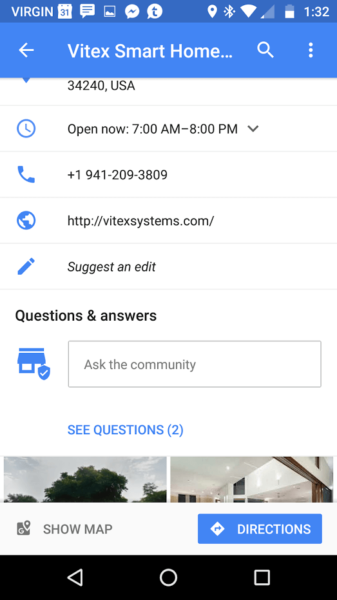
In mid-August, Google rolled out a new feature on the Google Maps app for Android called Questions & Answers. This feature is currently also available on mobile browsers.

Here are some aspects of this new feature that business owners and marketers may need to be aware of.

1. If you don’t see the feature, you might need to update the app

I’ve spoken to many users who don’t see the feature on listings, but once they go to the Play Store and install an update to the app, they are able to see it.

2. Customers don’t get notifications (yet)

If a user asks a question, he or she won’t get notified when someone responds. This is contrary to what Google stated in their announcement: “When you get an answer, we’ll notify you through Google Maps.” In every test I have done thus far, the user who asks the question doesn’t get a notification when you respond to it. My assumption is that this is a bug that will get corrected over time.

3. Business owners will need the Google Maps app to keep track of questions

In order to be notified about questions submitted by customers, business owners must have the Google Maps app and must be signed in with the same Google account that they use to manage their listing in Google My Business. These notifications don’t show up anywhere currently in Google My Business, so if you’re not using the Google Maps app, you will have no idea when someone asks a question about your business.
To test this, I had another user submit a question on a listing that I manage via Google My Business. Within seconds, I got a push notification on my phone on the Google Maps app.

4. You can see the profile and name of the person who asked the question

On the initial screen that shows the questions, you don’t see any information about who submitted the question — but all you need to do is click the question itself to see this info.

5. Business owners should avoid answering with a generic “yes” or “no”

Tom Waddington pointed out that a business owner would have no idea if the user goes back and edits their question later. For example, I could post a question on the listing for a restaurant asking, “Are there vegan options?” If they responded with just “yes,” I could go back and edit my question to change it to, “Have you been cited by the health department?” and the answer would stay the same.
It’s always best to stay one step ahead of spammers. We all know this feature is going to get abused at some point.

6. Upvoting questions will impact how they show up

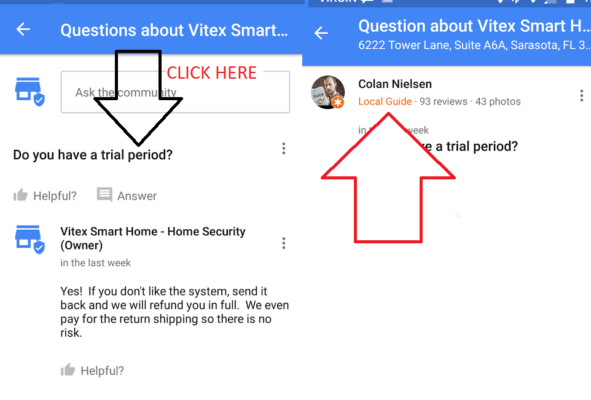
In their announcement, Google mentioned that “upvoting makes popular questions more visible.” I tried this out on a listing to see what the impact was. Before the question had any votes, this is how it appeared:
I had someone go and “like” the question (not the answer), and a few minutes later, the listing now looked like this:
Notice how the question and answer both show up on the actual listing itself now, without the user having to click further.

Final thoughts

I anticipate that Google will continue to make developments to this feature to help make it more useful to both users and businesses. If you have any success stories about Questions & Answers that you want to share, feel free to reach out to me on Twitter.

Some opinions expressed in this article may be those of a guest author and not necessarily Search Engine Land. Staff authors are listed here.

know more latest update or tips about Search Engine Optimization (SEO), Search Engine Marketing (SEM) - Fill ContactUs Form or call at +44 2032892236 or Email us at - adviser.illusiongroups@gmail.com.

Wednesday, 6 September 2017

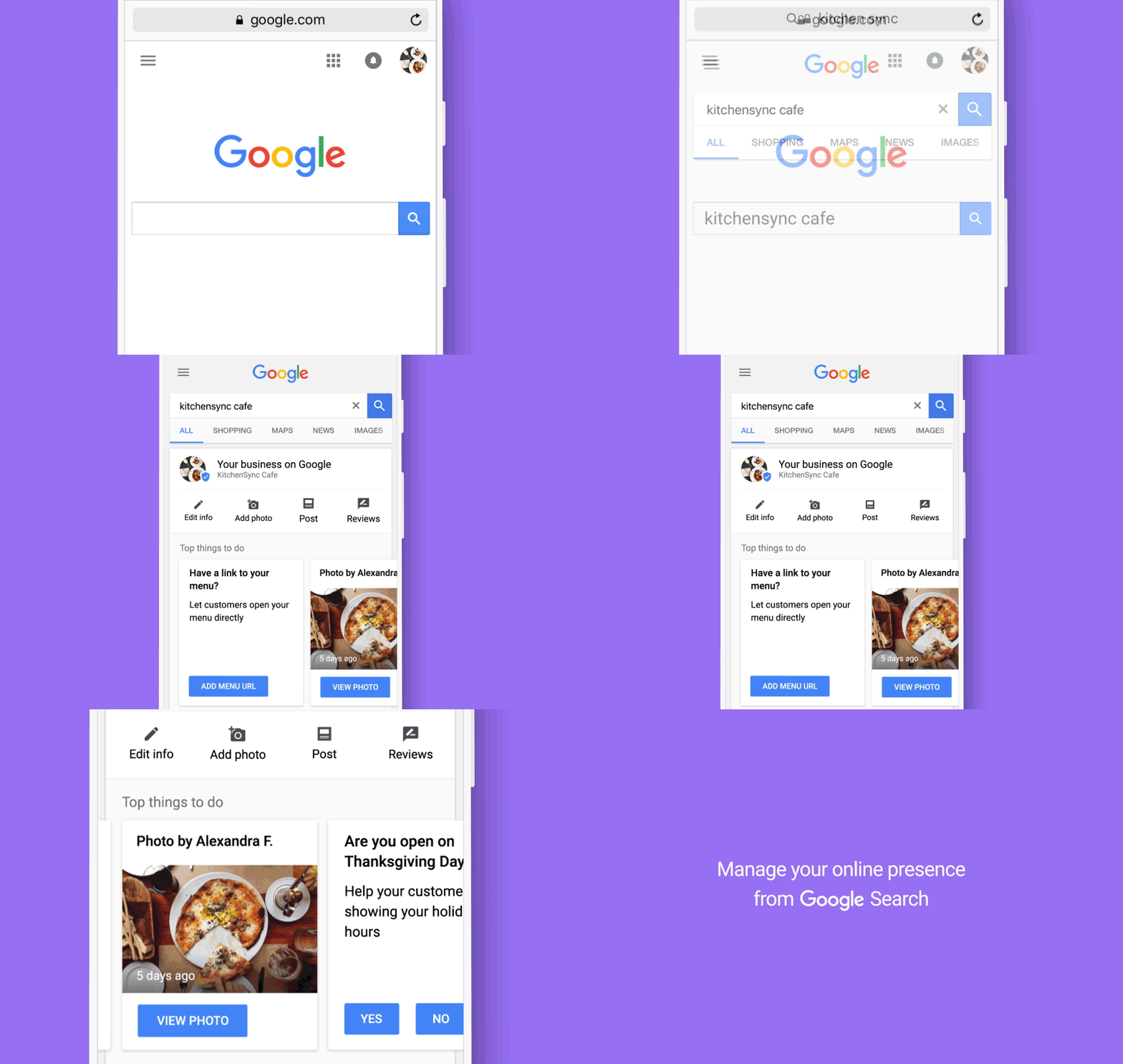
Google My Business now lets businesses edit their listings directly in search results

After months and months of testing, Google is rolling out inline editing in search for local businesses.

Google has announced they are now fully launching the ability for businesses to quickly edit their Google My Business local listing directly in the Google search results. We saw Google testing this feature back in July 2017, and now it is officially rolling out.
Google said all you need to do is find your business on Google Search, “and you can complete and enhance your listing, share photos and posts related to your business, and see how many views you’re getting.” After you find your business in search, you should see a new menu right above the search results. If you’re not seeing the menu, make sure you’re logged in with the account credentials that have ownership of your Google My Business account. Then click the edit button and the fields you can edit will be highlighted for you.
Here is a GIF of it in action:
Here is what you can do from the search results:
  • Add or correct business information, post updated hours, and more.
  • Post on Google and stay engaged with your customers.
  • Share photos that make your business stand out.
  • See how many views your listing gets, and easily access detailed information about your listing’s performance.
  • Know when users upload photos of your business.
  • Quickly take the most important actions to complete and enhance your business listing.
You can do this from both desktop and mobile:
Clearly Google is looking for ways to get business owners to be more proactive with updating their business listings. The quick questions about if the business is open on an upcoming holiday and the ability to update your listings in search is a clear win-win for both Google and business owners.
know more latest update or tips about Search Engine Optimization (SEO), Search Engine Marketing (SEM) - Fill ContactUs Form or call at +44 2032892236 or Email us at - adviser.illusiongroups@gmail.com.

Saturday, 2 September 2017

SearchCap: Google iOS app trends, difficult clients & content SEO

Below is what happened in search today, as reported on Search Engine Land and from other places across the web.

From Search Engine Land:

Recent Headlines From Marketing Land, Our Sister Site Dedicated To Internet Marketing:

Search News From Around The Web:

Industry
Local & Maps
Searching
SEO
SEM / Paid Search
Search Marketing

Monday, 6 March 2017

SearchCap: Poor Google featured snippets, related picks & getting Google Assistant

Below is what happened in search today, as reported on Search Engine Land and from other places across the web.

From Search Engine Land:

Recent Headlines From Marketing Land, Our Sister Site Dedicated To Internet Marketing:

Search News From Around The Web:

Industry
Local & Maps
Link Building
Searching
SEO
SEM / Paid Search
Search Marketing

 know more latest update or tips about Search Engine Optimization (SEO), Search Engine Marketing (SEM) - Fill ContactUs Form or call at +44 2032892236 or Email us at - adviser.illusiongroups@gmail.com.

Tuesday, 28 February 2017

Bing UK now displaying National Health Service data for GP & hospital search queries

Searching for nearby GPs and hospitals on Bing UK will surface information pulled from the country's publicly-funded national healthcare system.

According to the UK’s National Health Service (NHS), the publicly funded national healthcare system has been working with Bing UK during the last year to improve search results for general practitioner and hospital queries.
“Over the last year, we have collaborated with our friends at Bing to provide users with a comprehensive GP and hospital search experience,” reports a recent post on the NHS Choices blog.
The NHS says that queries for “GP in [location]” on Bing UK will now surface a list of local options with information on specific locations, open times and user reviews — all data that has been pulled from the NHS

Clicking on a result will display more information for the GP’s office.
To know more latest update or tips about Search Engine Optimization (SEO), Search Engine Marketing (SEM) - Fill ContactUs Form or call at +44 2032892236 or Email us at - adviser.illusiongroups@gmail.com.


Monday, 27 February 2017

Need to get with Google My Business support? Use Twitter!

While phone support may no longer be accessible if you need help with Google My Business, columnist Greg Gifford notes that social media support is available (and good!).

It’s the end of the month, and that means it’s time for another edition of Greg’s Soapbox! Except this time, it’s not so much me standing on the soapbox and ranting; I’m more standing near it and politely providing helpful advice.
Almost two years ago, I wrote a post here about using Google phone support if you had issues with Google My Business (yes, I’m not linking to the post on purpose). Depending on your particular keyword phrase when you search, that post usually ranks anywhere from #2 to #5 for any variation of “Google My Business support” — and it’s always the highest-ranking non-Google result.
The problem is, while phone support supposedly still exists, it’s IMPOSSIBLE to get to anymore. And, since it’s the highest ranking non-Google answer, a ton of messages come through every month from people who are pointing out that the method in the post doesn’t work anymore.
I wanted to write this month’s post and update everyone on the best way to get support for any problems you might be having with your Google My Business listing.
We all know that Google My Business can be frustrating. All too often, the person with access leaves a company and doesn’t share that access. It’s incredibly difficult to get access to an account once it’s lost.
You might need to update your address, or phone number, or uploaded photos. You’ll definitely need to reply to reviews. Without easily accessible phone support, it doesn’t appear that there are any alternative options.
In reality, there’s a much better support option that most people don’t know about: Twitter support! Simply shoot a quick tweet over to @GoogleMyBiz, and their support team will jump on your request and help you out.
When the service first rolled out, responses were incredibly quick. Now that more people know about it, you might have to wait up to 30 minutes for a response, but once you get a response, they’re amazingly fast at resolving your situation. They’ll ask you to send a Direct Message with full details of your situation, and in almost every situation, the issue will be resolved shortly thereafter.
Big shoutout to Jared, who’s an absolute beast. I know there are other people on the team, but somehow he’s been the one to help with every request I’ve made in the last six months or so.
It’s all US-based, Google employee-staffed support. They won’t follow any sort of script; they’ll simply ask for more details, then they’ll jump in and get you sorted out. If you haven’t used it yet, you need to try it — it’s amazing.

Some opinions expressed in this article may be those of a guest author and not necessarily Search Engine Land. Staff authors are listed here.
To know more latest update or tips about Search Engine Optimization (SEO), Search Engine Marketing (SEM) - Fill ContactUs Form or call at +44 2032892236 or Email us at - adviser.illusiongroups@gmail.com.

Monday, 13 February 2017

Google Maps new feature lets users create lists of saved places that can be shared & accessed offline

Users can keep track of saved places and share lists with others via text, email and popular messaging apps.

Google Maps has added a new list-making feature that lets users save locations to a specified list so that it can be accessed later — even offline — and shared with other users.
To save a location in Google Maps, tap on its name and then the “Save” icon to add it to a list. Lists of saved places can be organized under preset lists Google has already named, like “Want to go” or “Favorites,” or users can create a new list.
Google says lists can be shared by text and email, on social networks and via popular messaging apps.
From the Google Maps Blog:
Whenever friends and family come to town, tap the share button to get a link and start flexing your local knowledge muscles. Once you send a link to your out-of-towners, they can tap “Follow” to pull up the list from Your Places whenever they need it.
Google posted the following video to show how the new feature works:
Google says the new list-making feature in Google Maps works on both desktop and Android and iOS mobile devices.

To know more latest update or tips about Search Engine Optimization (SEO), Search Engine Marketing (SEM) - Fill ContactUs Form or call at +44 2032892236 or Email us at - adviser.illusiongroups@gmail.com.