Pages

Showing posts with label GOOGLE ADS. Show all posts

Sunday, 17 September 2017

Spark Foundry takes home Bing’s 2017 Agency of the Year & Innovator of the Year awards

Hosted by the Daily Show's Trevor Noah, Bing's 2017 Agency Awards event celebrated "the practice of search" by recognizing key executives and agencies.

Spark Foundry was the big winner at last night’s Bing 2017 Agency Awards event.
With offices in both New York City and Chicago, Spark Foundry was named Agency of the Year for the US and Innovator of the Year, and the team’s Colette Trudeau took home the Trailblazer of the Year Award.
Bing handed out 15 different awards during the program to search industry executives and agencies.
“This is a glamorous black-tie affair that celebrates the practice of Search and recognizes our key agency partners for their outstanding creative, effective and passionate work with Bing Ads in the Americas,” wrote Bing on its Search Blog, when it announced the event back in June.
Spark Foundry shared its Agency of the Year Award for the US with Performics Practices Team. Bing also gave an Agency of the Year Award for Canada to iProspect and an Agency of the Year award for Brazil to Blinks.
In addition to Trudeau, other individuals to be recognized included iProspect’s Jeremy Hull, who won Executive of the Year, and Performics’ David Gould, who was awarded the Lifetime Achiever Award.
Here’s the full list of Bing’s 2017 Agency Award Winners:
  • Agency of the Year for the US: Spark Foundry and Performics Practices Team
  • Agency of the Year for the Canada: iProspect
  • Agency of the Year for the Brazil: Blink
  • Executive of the Year: Jeremy Hull (iProspect)
  • Trailblazer of the Year: Colette Trudeau (Spark Foundry)
  • Lifetime Achiever Award: David Gould (Performics)
  • Account team of the year: Mindshare
  • Innovator of the year: Spark Foundry
  • Growth agency of the year: Initiative Search Team at Reprise
  • Independent agency of the year: iCrossing
  • Optimizer of the year: LQ Digital
  • Partner of the year: Resolution Media
  • Philanthropist of the year Seer Interactive
  • Accreditation champion of the year: US’s Sapient Razorfish and Canada’s Catalyst
  • Rising star of the year: Metric Theory
“Our agency partners play a critical role in shaping the future of search and bringing to life the opportunities search offers marketers to both better understand consumer intent and drive impactful and measurable digital engagement,” wrote Paul Longo, Bing’s head of agency development, on Bing’s blog post announcing the winners.
This was the second year for Bing’s Agency Awards event. It was held at the Capitale in New York with celebrity emcee Trevor Noah.

know more latest update or tips about Search Engine Optimization (SEO), Search Engine Marketing (SEM) - Fill ContactUs Form or call at +44 2032892236 or Email us at - adviser.illusiongroups@gmail.com. 

Thursday, 2 March 2017

6 steps to creating high converting native ads

How to break above the noise with native advertising.

Reaching your target audience and gaining traction and interest with native ads is far more complex than simply slapping up an ad that will integrate with a medium. Make sure your native ads are working for you. With the threat of ad blocking, creating native ads the right way is growing in importance.
According to industry research, if ad blocking remains at its current level across the board, publishers will lose $35 billion by 2020. One of the best ways publishers and marketers can combat this hold on digital advertising is to branch into native ads with content that’s done correctly. But how?
Follow this simple, 6-step guide from Experts Exchange to learn how to create successful native ad campaigns. Visit Digital Marketing Depot to download your copy.
To know more latest update or tips about Search Engine Optimization (SEO), Search Engine Marketing (SEM) - Fill ContactUs Form or call at +44 2032892236 or Email us at - adviser.illusiongroups@gmail.com.

Sunday, 22 January 2017

Former Google search chief Amit Singhal joins Uber

Singhal will become a senior vice president of engineering, overseeing Uber's Maps & Marketplace departments.

What do you do after running Google search for 15 years? For Amit Singhal, it was going to be time off and a focus on his foundation. But now, Google’s former search chief is joining Uber as a senior vice president of engineering overseeing the Map and Marketplace departments.
TechCrunch has a long interview with Singhal and the news. He left Google about a year ago and has been spending time on his foundation to help get promising kids to top schools in India. But with that apparently humming along, it sounds as if Singhal was ready for a new challenge — one that came up after meeting Uber CEO Travis Kalanick.
Singhal said he found the computer science challenge of Uber too interesting to pass up. From what he told TechCrunch:
“This company is not only doing things that are amazing, this company also has some of the toughest computer science challenges that I have seen in my career of 25 years,” Singhal told me. “Those computer science challenges for a computer science geek are just intriguing — you give a geek a puzzle, they can’t drop it; they need to solve the puzzle. That’s how it felt to me.”
Amazingly, he puts the challenge at Uber on par with the challenge of creating a search engine:
“At Uber, this team is actually hiding so much deep science behind a very simple interface of pushing a button and having a car show up,” Singhal explained. “The science that goes on behind that is equally as complex as what we had to do at Google.”
Perhaps the science is deep, and no doubt there are challenges with it, but as complicated as coming up with the right answers to billions of different questions asked and answered each day by Google?
TechCrunch also separately reports that Uber has picked up another former Googler, Kevin Thompson, who was VP of engineering on ads for YouTube. He’ll be the vice president, marketplace engineering, for Uber.
To know more latest update or tips about Search Engine Optimization (SEO), Search Engine Marketing (SEM) - Fill ContactUs Form or call at +44 2032892236 or Email us at - adviser.illusiongroups@gmail.com.

Thursday, 5 January 2017

Are your paid search ads making the right impression?

Impression share may not be the ultimate measure of paid search success, but columnist Jacob Baadsgaard shows how tracking this metric can lead to paid search improvements that can really boost your bottom line.

Impression share is an interesting paid search metric. On the surface, you could argue that impression share is a fairly useless metric. In fact, I’ll admit that I’ve argued for years that impressions really aren’t an important measure of paid search success.
However, while I still strongly believe that ROI — not impressions, clicks or conversions — is the ultimate gauge of paid search success, impression share itself is far from a useless metric.
In fact, after auditing thousands of paid search accounts at Disruptive Advertising, we’ve found that impression share is often the difference between effective campaigns and ineffective ones.

Are you paying for the wrong impressions?

Typically, most advertisers consider paid search impressions “free.” And that makes sense; paid search advertising is based on a cost-per-click (CPC) model, not a cost-per-impression (CPM) model.
If you get 1,000 impressions and only one click, you only pay for the one click, right?
That’s technically true, but there’s a hidden economy to paid search advertising. If you can’t afford to pay for more clicks, Google stops showing your ads.
So, in effect, if you can’t pay for more clicks, you can’t pay for more impressions.
This hidden economy begs the question, “Are you paying for the wrong impressions?” After all, if impressions come at a cost, you really can’t afford to spend your budget on the wrong impressions (and, by extension, clicks).

What a waste!

To answer that question, we need to take a look at your keywords. Open your paid search account, adjust your date range to cover the past three to six months, and then choose the tab labeled “Keywords.”
After that, choose the Filter drop-down menu and create a new filter for Conv. rate < 2%. It should look like this:
See the problem here? Eleven percent of their ad spend is paying for five poorly converting keywords!

Making the wrong impression

Obviously, it’s frustrating to waste money on impressions that aren’t leading to conversions. Unfortunately, since most advertisers have limited budgets, all of that wasted ad spend also has consequences for their other campaigns.
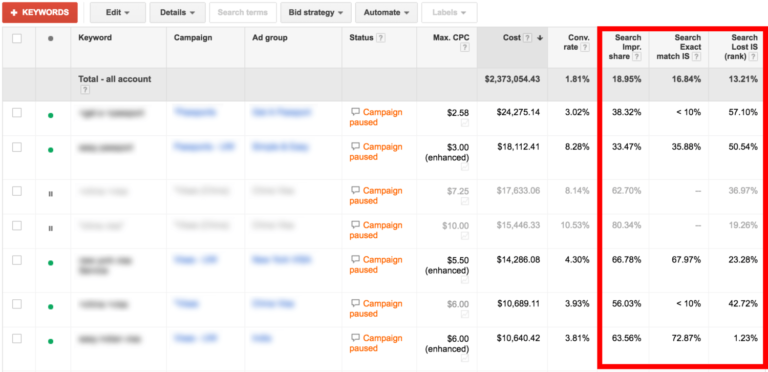
This is where things start to get interesting. Change your filter to Conv. rate > 2%, click Columns > Modify columns, and then select “Search Lost IS,” “Search Exact match IS,” and “Search Impr. share” like so:
You’ll end up with a list that looks something like this:
Now you can see just how wasted ad spend sucks the budget away from the best keywords.
Check out the second keyword. It has a conversion rate of 8.28 percent, but it only gets one-third of the potential impression volume — even when the exact keyword gets typed in!
The question is, why?

Search Lost IS (rank)

When you look at the column for Search Lost IS, you can see that this client is losing 50.54 percent of potential impressions due to rank issues.
You know what that means? Their bids are too low.
When a keyword is converting this high, that’s a big problem. Large chunks of the ad budget are being spent on keywords that do almost nothing for the client, while their best keywords don’t have enough budget to rank properly!
The easiest way to fix this is to simply turn up the bids. You need to remember, though, that upping your bids and ranking comes at a cost. Your CPC will increase, increasing your cost-per-conversion, which ultimately increases your cost-per-sale.
If the keyword is a clear winner like this one, that’s not a big deal, but if that keyword is barely profitable at the CPC it’s currently at, increasing the CPC to improve impression share might not be the best idea.

Search Lost IS (budget)

Low-ranking ads aren’t the only way you lose impression share. Remember, if you’re paying for the wrong impressions and clicks, you can’t afford to pay for the right ones.
Now, the Keywords report doesn’t show Search Lost IS (budget), so you need to find it in the Campaigns report. Jot down which campaigns your high-performing keywords happen to be in, and then click on those campaigns in the Campaigns tab.
Once you’re in the campaign, add a column for Search Lost IS (budget). This will let you see the percentage of potential impressions that are being lost in this campaign because of limitations of budget.
Remember that keyword with the 8.28 percent conversion rate? It was in a campaign that was losing 77 percent of its impression share because of budget limits.
That meant the keyword was only getting 33 percent of the potential impressions, and the campaign itself was only receiving 23 percent of the possible impressions due to insufficient budget.
And where was all that budget going? It was paying for worthless impressions!
I’m starting to sense an opportunity here. Are you?

Fixing things

Once you know which keywords are driving the wrong impressions and which ones are making a great impression, fixing things is actually fairly simple.
Cut the budget from your lame keywords. They don’t need it. Then, redirect that spend to your great keywords. Your top keywords should be getting at least 90 percent of the available impression share.
It might seem like a simple fix, but it really works. Here’s what happened for this client when we redirected their budget from their useless keywords to their high-performing keywords:
search-lost-is-vs-conversions
Literally the day after we switched things up for our client, their ads were showing for the proper searches twice as often! Oh, and sales increased by more than 50 percent within a month. After a year of optimization, sales were up by nearly 200 percent.

Conclusion

So, while impression share may not be the ultimate measure of paid search success, impression share is still an incredibly important metric to track.
Just remember, every click has a cost. Paying for one click means you can’t pay for another. And if you’re wasting your budget on the wrong clicks, you won’t have the budget to pay for the right ones.
To know more latest update or tips about Search Engine Optimization (SEO), Search Engine Marketing (SEM) - Fill ContactUs Form or call at +44 2032892236 or Email us at - adviser.illusiongroups@gmail.com.


Monday, 28 November 2016

Ad customizers just got a whole lot more powerful

Columnist Frederick Vallaeys discusses the new capabilities of ad customizers in AdWords, explaining how you can use them to serve better, more relevant ads.


I’m always looking for an edge in PPC so that my campaign’s performance will shine in a very competitive landscape. Back in 2013, I started talking about how to use programming to set up time-saving and performance-boosting automations with AdWords Scripts, at the time among the newest capabilities in AdWords. But now that we’re about to head into 2017, there’s an entirely different AdWords power feature that is starting to let us use programming to improve performance: ad customizers (“customizers” for short).
Customizers sit at the intersection of two of my favorite topics: feed-based advertising and programming. I’ll cover some innovative ways to use the older feed-based capabilities, but I’ll also cover some of the brand-new programming-based ways to use the feature to show different ads based on the device or the audience list a user is on.

Ad customizers just got new capabilities

The customizers’ capabilities that have now been available for a few years are most easily thought of as a very powerful variant of dynamic keyword insertion (DKI). Rather than just giving advertisers the ability to insert the keyword into the ad, any piece of text can be inserted from a spreadsheet that is maintained in the Business Data section of AdWords.

The brand-new customizer capabilities use simple functions and code to customize the text. For example, there is a function to show a countdown timer, as well as a brand-new IF function (not yet available in all accounts). These IF statements can be used to do different things depending on certain conditions, like the device a user is on or an audience list the user is a member of.

Ad customizers reduce account complexity

One of the advantages of customizers is that they reduce the need to maintain multiple campaigns when you want to slightly vary the messaging depending on different conditions. For example, while you could achieve the same by maintaining two campaigns — one for smartphones and one for computers — you can use customizers to show different ads while still using just a single campaign. This can be desirable when you’re close to hitting account size limits, or when you want to simplify account management (e.g., no need to add a new keyword in two places).

Ad customizers can now use default fallback text

Besides the new “IF” function in customizers, another welcome new addition is the availability of default text. In the past, any ad groups using ad customizers required the use of a fallback ad that didn’t use customizers. For advertisers doing manual A/B ad testing, this made things complicated because in addition to calculating winners and losers, they also had to account for the fact that if the fallback ad was deleted, the entire ad group would no longer be eligible to serve ads. And while it’s relatively easy to identify ad groups with no active ads (in Editor, for example), it’s much harder to find ad groups that are effectively in the same boat, not because there are no ads, but because there are only ad customizer ads.
Now you can include a default insertion when using customizers, making it unnecessary to write a fallback ad. Just like with the default text for DKI, if a particular dynamic insertion makes the ad too long, the default will be used instead.
The format to include default text is just the same as for DKI: simply add a colon and the default before the closing curly bracket, e.g., {=DataSetName.AttributeName:Default Text}.

Show a countdown timer

The countdown feature shows how much time remains, for example, before the end of a special promotion, or the last time to qualify for free shipping before Christmas. As the end date nears, the countdown will go from saying how many days are left to how many hours, and eventually, how many minutes, e.g., “3 days,” “5 hours,” “10 mins.” The feature works in all languages and can optionally be set to only start showing a countdown as you get relatively close to the end date — a useful feature, since saying that there are “just 50 days left before Christmas” isn’t likely to instill any real sense of urgency and may quite possibly have the opposite effect.
The feature can count down based on your account time zone, which is useful if you’re running a contest and there is a global cutoff time for submissions (e.g., the contest closes at midnight Central European Time, regardless of where in the world the participant is located).
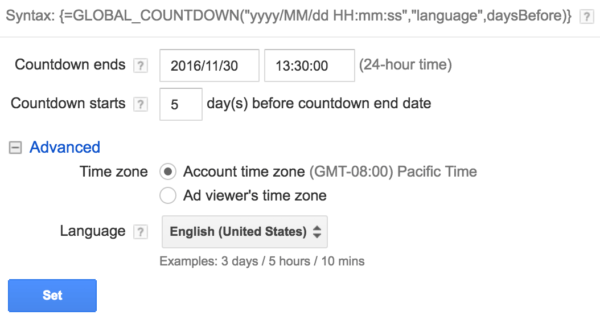
To use this, insert {=GLOBAL_COUNTDOWN(“2016/11/30 13:30:00″,”en-US”,5)} into your ad. The date refers to the end date, “en-US” refers to the language to insert into the text, and the number 5 tells the system to only start the countdown when there are five or fewer days left before the end.
By default, the countdown is based on the time zone of the user and would look like this in your ad: {=COUNTDOWN(“2016/11/30 13:30:00″,”en-US”,5)}
The easiest way to set this up correctly is to use the ad builder interface on the AdWords website.

While you can run this feature without the need for a business data spreadsheet, you can optionally set the end date in the spreadsheet and then reference it in the ad as follows: {=COUNTDOWN(AdCustomizerFeed.Date, ‘es’, 3)}, where “AdCustomizerFeed.Date” refers to the business data file, followed by a dot and the column header in the spreadsheet that contains the date.

Show device-specific ads

As I explained in my recent column about what elements make the perfect Expanded Text Ad, there is actually a way to show different ETAs on mobile devices and on desktops. It’s done by adding two rows to Business Data, one that includes the text for mobile devices and another that contains the text for non-mobile devices. The reality of using this is that it’s a lot of extra work to maintain an entire spreadsheet with the text variations when the only thing you’re trying to do is show device-specific ads.

As I mentioned in my last post, Google was working on an easier alternative, and now we know what this is: “IF functions” in Customizers. The concept is very simple: you specify an IF condition, and then write the desired text for when that condition is met.
Here’s an example from Google:
{=IF(device=mobile,text to insert):optional default text}
The text “optional default text” is really the text you want to show when the user is not on a mobile device, so here’s how I would formulate that same example:
{=IF(device=mobile,hello mobile user):hello desktop user}

Show audience-specific ads

Another brand-new capability that comes with using IF functions in Customizers is to use it to vary the ads for different audiences. Until now, showing different ads for different audiences required creating separate ad groups, each with a different audience target and a unique ad text. Now it is possible to maintain both different bids and different ads within a single ad group, which reduces the need to bloat an account with extra structure.
Just as with device-specific ads, the syntax for audience specific ads looks as follows:
{=IF(audience IN(returning visitors,cart abandoners),30%):25%}
“returning visitors,cart abandoners” is a comma-separated list of audience names.

Show product-driven ads

Jason Puckett gave a good overview recently of how to turn an e-commerce feed into relevant ads . This is basically using Customizers as a super-advanced variant of DKI. It’s a concept we’ve taken even a step further at my company, Optmyzr, to allow not only ads, but also ad group names and keywords to be generated on the fly based on spreadsheet data.
One issue we commonly see at Optmyzr is that merchant center data feeds are not well-suited to dynamic ad generation because the title and description fields are too long for use in ads, and there are often not enough product attributes to make it easy to create a good ad from a template. However, with a bit of thought about the templated structure that ads should follow, it’s usually possible to create a new spreadsheet of data that will be well suited for this task.

Show location-specific ads

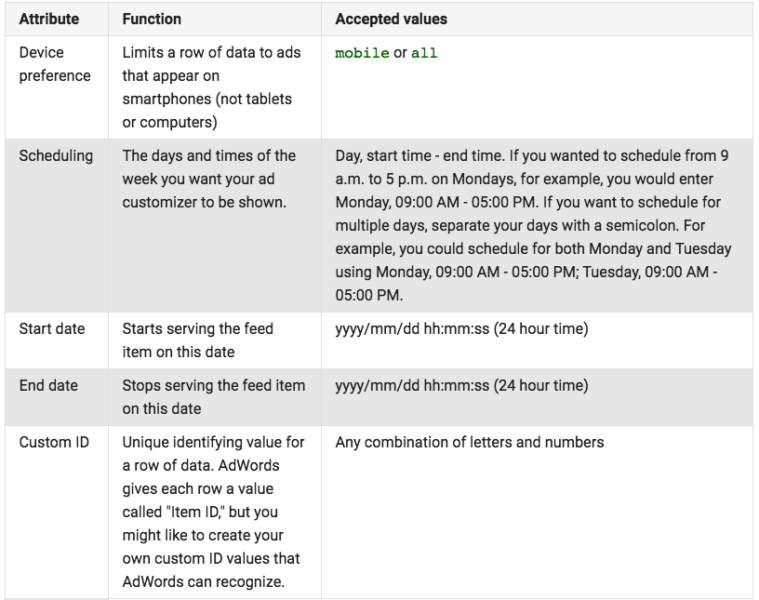
Customizers also have targeting attributes which let you do different things in different scenarios that depend on any of the targeting options shown in this table from Google:

One way to use this is to show different ad variations in different locations without requiring entirely new campaigns that target each location.
A nice example would be for a same-day plumbing service. Customizer data could be used to maintain a list of how quickly a plumber could show up to different cities. Rather than maintaining the times in hard-coded ads, now the time can be dynamically inserted from the business data.

Schedule business data to be updated

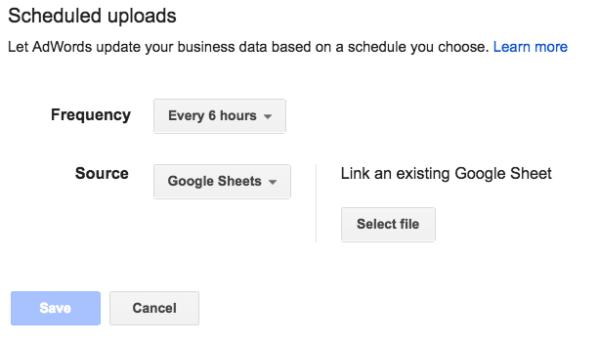
When using customizers to keep ads in sync with inventory, service times and other elements that may change frequently, it’s probably a good idea to schedule the data to be automatically uploaded to Google.

Data can be sent to Google automatically as often as every six hours, and the source can be a Google Sheet or a file on your web or FTP server.
By using a Google Sheet as the source, now even a non-technical person who doesn’t know how to upload files to FTP or a web server can be put in charge of periodically updating the inventory in an easy-to-use tool like Sheets to have that automatically uploaded to change the ads.

Show different ads at different hours

Another nice capability of Customizers is to connect them with ad schedules. One of the standard attributes is for ad schedules. Here is the full list of standard attributes from Google:

Rather than maintaining both ads as separate entities, now you can use Business Data to mix things up. For example, you could put two variations of headline 2 in a spreadsheet, and then call it dynamically in the ad using something like this: {=MyData.headline2:default headline 2 text}.

Conclusion

Ad customizers are far more powerful than most advertisers realize (except for Matt Umbro), and with new capabilities like default insertion text, IF functions for devices and for audiences, and automated upload schedules for business data, the power of this feature has dramatically increased and can help us show even more relevant ads than before.
To know more latest update or tips about Search Engine Optimization (SEO), Search Engine Marketing (SEM) - Fill ContactUs Form or call at +44 2032892236 or Email us at - adviser.illusiongroups@gmail.com

Saturday, 12 November 2016

Meet a Landy Award winner: Wolfgang Digital integrates search and TV into a cross-channel campaign for a big Irish retailer

The result for Littlewoods Ireland: the most successful Christmas campaign ever


Retailer Little woods Ireland, founded in 1923, now sells its fashion, gadgets and home ware products exclusively online. The company makes almost half of its annual revenue in November and December.
Their search marketing agency, Wolfgang Digital, found that it usually takes four website visits before most visitors make a purchase. So Littlewoods asked Wolfgang Digital to create a campaign for their 2015 Christmas season built around this finding.
The result, in addition to boosting conversions by eight times more than standard campaigns in Littlewoods Irelands’ most successful Christmas campaign ever, is that Wolfgang Digital won this year’s Landy Award for Best Integration of Search into Cross-Channel Marketing.
“[Google Analytics] told us,” Wolfgang Digital CEO Alan Coleman said via email, “that it was unrealistic for us to expect people to click on a search ad, visit the website and buy.”
“So for a search ad to be effective,” he told me, “we needed to create at least three other touch points around it.”
“From other cross-channel campaigns for Wolfgang Digital clients, we’ve seen plenty of evidence that conversion rates increase as you communicate with the same user in a consistent manner across multiple channels.”
The first touch point in the Littlewoods campaign was a single TV ad, which was intended to drive viewers to the web, via a text overlay on the ad that recommended viewers “Shazam now to shop the ad.” That meant smartphone users should let the Shazam mobile app listen to the TV ad’s soundtrack. When it did, the user was brought to the campaign’s landing page on the web, which contained purchaseable product ads relating to the TV ad. Here’s a still from the littlewoods-ireland-christmas-2015-tv-ad-image-4
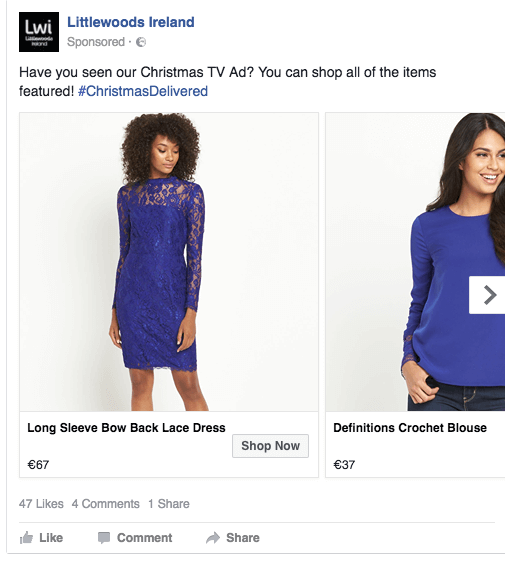
The second touch point: online ads. The TV ad also contained Littlewoods Ireland’s Facebook and Twitter locations, which similarly contained ads relating to the TV one, displayed around the times of the TV ad’s broadcasts. Here’s a Facebook ad from the campaign:littlewoods-ireland-chrismas-2015-fb-ad-1
Wolfgang expected some users to search Google for related terms when they saw the TV ad, so there were AdWords ready to be displayed for specific searches, for such terms as “toys” or “Christmas decorations.”
The campaign also utilized Google’s RLSA to target website visitors with their ads, when they searched on Google.
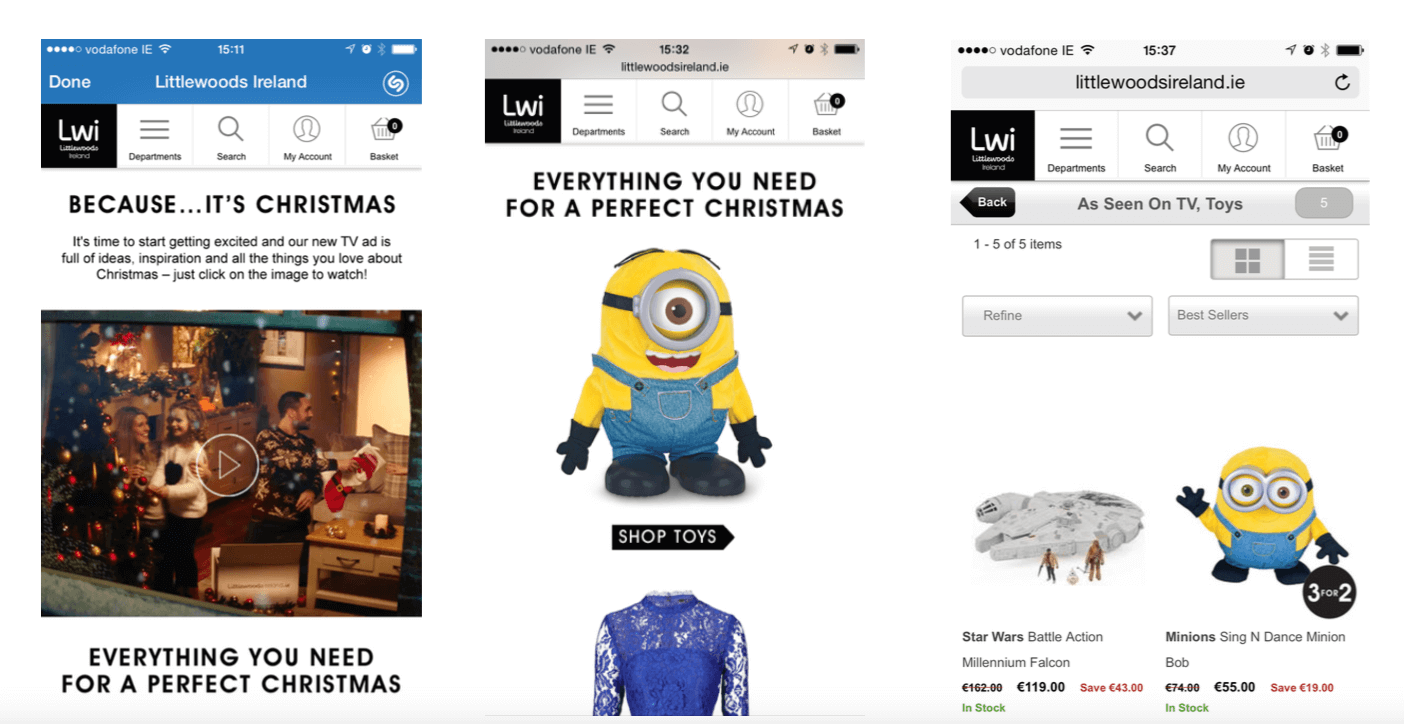
The landing page — the third touch point — linked to various behind-the-scenes videos about the TV ad on YouTube. Here are some of the mobile landing pages:mobile-landing-pages
The fourth touch point: Visitors to the landing page or the YouTube videos were retargeted via cookies or mobile ID, so they saw related ads on other sites across the web.
Additionally, there were “interesting facts” offered to the press:
For instance, Littlewoods Ireland found that, when looking at what sold best and when, it turned out that vacuum cleaners were most popular on Tuesdays, earrings on Saturday mornings, tights on Mondays, and, at 8:23 p.m. on Thursday evenings, it’s knickers — British slang for panties. Some publications picked up those and other interesting facts. When the publications were online, the tidbits were linked to the Littlewoods website.
And there was specific, linked content added to the Littlewoods blog, such as: “How to get the Best Black Friday Deals” and “Can’t Wait for Black Friday? Littlewoods Ireland has a sale right now!”
When an online sale was made, there was a secondary retargeting campaign offering a cash voucher to buyers if they recommended a friend.
“The unique element of this campaign,” Coleman told me, “is it took multiple marketing channels both offline and online and created a seamless cross channel communication to the user as they moved from awareness, to interest, to action and beyond to loyalty and advocacy.”

To know more latest update or tips about Search Engine Optimization (SEO), Search Engine Marketing (SEM) - Fill ContactUs Form or call at +44 2032892236 or Email us at - adviser.illusiongroups@gmail.com 

Sunday, 9 October 2016

Why are payday loan ads still showing on Google after the ban?

A deep look at how the payday loan industry is able to keep advertising despite Google's policy changes.


To consumer advocates, payday loans have become synonymous with predatory lending. The small short-term loans often come with astronomical interest rates that can pull consumers who are trying to get by from paycheck to paycheck into a deepening hole of debt.
Just this week, the FTC fined a payday lending group $1.3 billion for deceptive loan practices. Industry watchdog groups have been advocating for more regulation and pressing for change, and in May, Google announced it would start to ban payday and high-interest loan ads.
The ban started rolling out the week of July 20. There were estimates the move could cost Google millions in lost ad revenue. Yet, more than two months later, it appears the ban is likely having little to no impact on Google’s bottom line. as ads continue to fill the available slots on desktop and mobile. Why? Because it’s not an actual ban, and the advertisers quickly figured out how to change their messaging to meet Google’s policies.
In a review over the past month, I have found advertisers showing messaging on landing pages from Google ads that complies with the new restrictions (APR rates no higher than 36 percent and minimum repayment period of 60 days). But the fine print shows the ranges shown on the landing pages are essentially just a way of getting around payday loan policy. And fine print isn’t the only way the companies are evading the rules.

Non-Direct lenders aren’t responsible for actual APRs
With very few exceptions — Discover Personal Loans and CashNetUSA being two — the advertisers are lead generators, or loan brokers, which means they aren’t doing the actual lending. By being one step removed from the actual lending process, these advertisers can list terms that fall within Google’s payday loan policy on their ad landing pages without having to actually be beholden to those terms.
The terms listed on the landing pages (often in fine print at the bottom of the page) from the lead generators’ advertising varies, but often you’ll see some terms that fall within the range of Google’s policy, but when read carefully, make clear that the actual APR could vary outside that range (i.e., higher). Here are just two examples (bolding is mine).
From LoansOfSuccess.com:
“LoansOfSuccess cannot guarantee any APR, since we are a lending network. Though a Representative APR can range between 5.99–35.99%. The Maximum APR is 35.99. When accepting a loan from a lender, the lender can provide a different APR than our range. Please check the loan disclosure before approving and signing the agreement for your loan.”
From WeLoan2U.com:
“Consumers, who qualify with a lender, can be offered loans with APRs below 36% and have payment terms ranging from 61 days to 60 months, or more. Cash transfer times may vary between lenders and may depend on your individual financial institution. For details, questions or concerns regarding your loan, please contact your lender directly.”

LendingTree took this a step farther by explicitly stating on its landing page that because I clicked through “via a paid Google advertisement,” the offers I’ll see on LendingTree will feature quotes “of no greater than 35.99 percent APR with terms from 61 days to 180 months.” Sounds great, except “Your actual rate depends … and will be agreed upon by you and the lender.”

No easy answers

This is an industry that has considerable lobbying power. It is currently fighting the Consumer Financial Protection Bureau’s proposed rule to address the debt traps that often occur with these types of loans. The National Association of Federal Credit Unions is among the groups pushing backon the proposed changes.
In some ways, Google’s efforts to crack down on predatory lending within its ads has only acted to further mask the actual workings of these companies as they keenly adapt to the policies without having to change practices. And it’s yet another game of whack-a-mole for the search giant.
A Google spokesperson told Search Engine Land, “We continue to implement our policy and will take action on ads and advertisers that are not in compliance. These actions include removing ads and permanently banning advertisers from using AdWords.”
I’m told that since introducing the policy change, Google has disapproved more than three million policy-violating ads before they could enter the ad auction and has taken action on thousands of advertisers’ accounts that were in violation of the payday loan policies.
The implementation of the new policy is only a few months old at this point, and Google is sure to continue to fine-tune how it gets implemented on the back end. Whether it will have a material effect on consumers remains to be seen. Google certainly has its part to play — and is still benefiting financially from these advertising practices — but in many ways, this is much bigger than a “Google problem.” And it’s is one of those cases where Google and Bing (and others) should be encouraged to coordinate on ad policies in the interest of consumers online.
To know more latest update or tips about Search Engine Optimization (SEO), Search Engine Marketing (SEM) - ContactUs or call at +44 2032892236
Referece taken by - SearchEnginLand