Pages

Showing posts with label MAPS. Show all posts

Friday, 8 September 2017

August 22, 2017: The day the ‘Hawk’ Google local algorithm update swooped in

Have you noticed a recent shift in Google's local search results? Columnist Joy Hawkins shares everything you need to know about the 'Hawk' update, which seems to have killed some of the changes we saw with Possum.

I recently reported on an algorithm update impacting the local results that happened on August 22, 2017. This was a strictly-local update, from what I can tell so far, which means that it had no impact on the non-local organic results.

What changed?

The update, which I have dubbed “Hawk,” was a change to the way the local filter works. To get some history here, Google actively filters out listings from the local results that are similar to other listings that rank already. Basically, Google picks the most relevant listing of the bunch and filters the rest. It’s very similar to what they do organically with duplicate content. (Note: Google is typically loath to confirm algorithm updates, usually only saying that it rolls out several updates every day, so these observations are based on an analysis of how local results have changed rather than on any official announcement or acknowledgment.)
The filter has existed for a long time to help ensure that multiple listings for the same company don’t monopolize the search results. In September 2016, the Possum algorithm update made a significant change to the way the filter works. Instead of just filtering out listings that shared the same phone number or website, Google started filtering out listings that were physically located near each other.
This was very problematic for businesses. It meant that if another business in your industry was in the same building as you — or even down the street from you — that could cause you to get filtered out of local search results. Yep, that means your competitors could (inadvertently) bump your listing!
On August 22, 2017, Google refined the proximity filter to make it stricter. It still appears to be filtering out businesses in the same building, but it is not filtering out as many businesses that are close by.

Who this helped

Here is an example of a business I was tracking that benefited from this update. Weber Orthodontics got filtered after the Possum algorithm update for the term “orthodontist wheaton il” due to the fact that they had a competitor down the street — 325 feet from where they were located. This competitor had a higher organic ranking and stronger relevance to that keyword, so they were included in the results, and Weber was filtered out.
Here is a before-and-after screen shot that shows how the local results changed as a result of the Hawk update; notice how Weber was completely missing from the results a few months ago.
I was able to nail down the exact date this happened because I have a robust tracking plan with BrightLocal that scans daily and takes screen shots. After studying multiple, completely unrelated cases, I was able to confirm that all cases had this same pattern on August 22.
Another example was this set of four hotels in Killeen, Texas. Previously, two of the four were filtered.

Now, following the Hawk update, all four are showing.

Who is still filtered?

Naturally, this update didn’t help everyone. Although it tightened the distance needed to filter a similar listing, it didn’t remove it completely. I’m still seeing listings that share an address or building being filtered out of local search results. I also see the filtering problem persisting for a business that is in a different building that’s around 50 feet away from a competitor.
Below, you can see that the local results for “personal injury attorney palmdale” — an example I shared in my Possum article — are still filtering out many attorney listings using the same virtual office address. (All the listings in red share the same address as the listing in green and are filtered 

Why ‘Hawk?’

The local search community settled on the name “Hawk” for this algorithm update, because hawks eat possums. This is one of the few times where I don’t see any negative outcomes as a result of this update and just wish Google hadn’t taken a year to realize the proximity filter was way too broad.

Some opinions expressed in this article may be those of a guest author and not necessarily Search Engine Land. Staff authors are listed here.

know more latest update or tips about Search Engine Optimization (SEO), Search Engine Marketing (SEM) - Fill ContactUs Form or call at +44 2032892236 or Email us at - adviser.illusiongroups@gmail.com.

6 things you need to know about Google’s Q&A feature on Google Maps

Noticed the new 'questions & answers' section in Google Maps app listings? Columnist Joy Hawkins shares her observations about this helpful new feature.

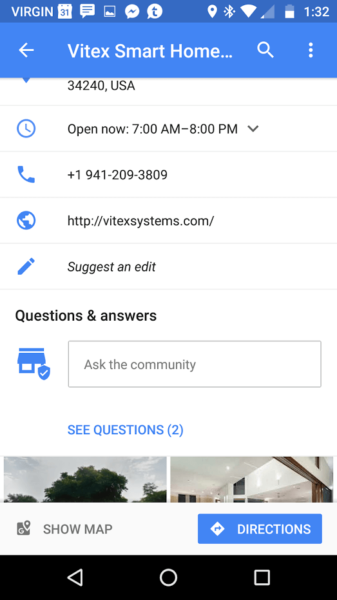
In mid-August, Google rolled out a new feature on the Google Maps app for Android called Questions & Answers. This feature is currently also available on mobile browsers.

Here are some aspects of this new feature that business owners and marketers may need to be aware of.

1. If you don’t see the feature, you might need to update the app

I’ve spoken to many users who don’t see the feature on listings, but once they go to the Play Store and install an update to the app, they are able to see it.

2. Customers don’t get notifications (yet)

If a user asks a question, he or she won’t get notified when someone responds. This is contrary to what Google stated in their announcement: “When you get an answer, we’ll notify you through Google Maps.” In every test I have done thus far, the user who asks the question doesn’t get a notification when you respond to it. My assumption is that this is a bug that will get corrected over time.

3. Business owners will need the Google Maps app to keep track of questions

In order to be notified about questions submitted by customers, business owners must have the Google Maps app and must be signed in with the same Google account that they use to manage their listing in Google My Business. These notifications don’t show up anywhere currently in Google My Business, so if you’re not using the Google Maps app, you will have no idea when someone asks a question about your business.
To test this, I had another user submit a question on a listing that I manage via Google My Business. Within seconds, I got a push notification on my phone on the Google Maps app.

4. You can see the profile and name of the person who asked the question

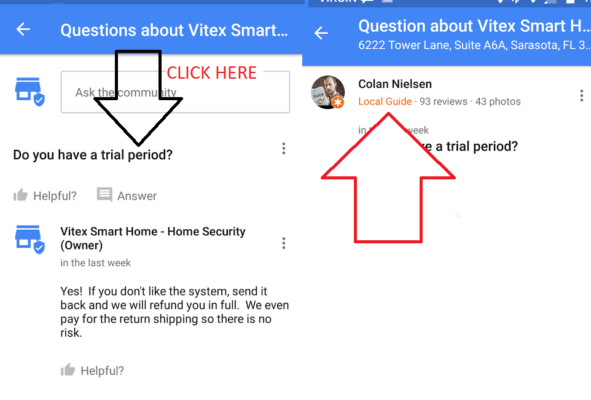
On the initial screen that shows the questions, you don’t see any information about who submitted the question — but all you need to do is click the question itself to see this info.

5. Business owners should avoid answering with a generic “yes” or “no”

Tom Waddington pointed out that a business owner would have no idea if the user goes back and edits their question later. For example, I could post a question on the listing for a restaurant asking, “Are there vegan options?” If they responded with just “yes,” I could go back and edit my question to change it to, “Have you been cited by the health department?” and the answer would stay the same.
It’s always best to stay one step ahead of spammers. We all know this feature is going to get abused at some point.

6. Upvoting questions will impact how they show up

In their announcement, Google mentioned that “upvoting makes popular questions more visible.” I tried this out on a listing to see what the impact was. Before the question had any votes, this is how it appeared:
I had someone go and “like” the question (not the answer), and a few minutes later, the listing now looked like this:
Notice how the question and answer both show up on the actual listing itself now, without the user having to click further.

Final thoughts

I anticipate that Google will continue to make developments to this feature to help make it more useful to both users and businesses. If you have any success stories about Questions & Answers that you want to share, feel free to reach out to me on Twitter.

Some opinions expressed in this article may be those of a guest author and not necessarily Search Engine Land. Staff authors are listed here.

know more latest update or tips about Search Engine Optimization (SEO), Search Engine Marketing (SEM) - Fill ContactUs Form or call at +44 2032892236 or Email us at - adviser.illusiongroups@gmail.com.

Saturday, 2 September 2017

SearchCap: Google iOS app trends, difficult clients & content SEO

Below is what happened in search today, as reported on Search Engine Land and from other places across the web.

From Search Engine Land:

Recent Headlines From Marketing Land, Our Sister Site Dedicated To Internet Marketing:

Search News From Around The Web:

Industry
Local & Maps
Searching
SEO
SEM / Paid Search
Search Marketing

Monday, 27 February 2017

Need to get with Google My Business support? Use Twitter!

While phone support may no longer be accessible if you need help with Google My Business, columnist Greg Gifford notes that social media support is available (and good!).

It’s the end of the month, and that means it’s time for another edition of Greg’s Soapbox! Except this time, it’s not so much me standing on the soapbox and ranting; I’m more standing near it and politely providing helpful advice.
Almost two years ago, I wrote a post here about using Google phone support if you had issues with Google My Business (yes, I’m not linking to the post on purpose). Depending on your particular keyword phrase when you search, that post usually ranks anywhere from #2 to #5 for any variation of “Google My Business support” — and it’s always the highest-ranking non-Google result.
The problem is, while phone support supposedly still exists, it’s IMPOSSIBLE to get to anymore. And, since it’s the highest ranking non-Google answer, a ton of messages come through every month from people who are pointing out that the method in the post doesn’t work anymore.
I wanted to write this month’s post and update everyone on the best way to get support for any problems you might be having with your Google My Business listing.
We all know that Google My Business can be frustrating. All too often, the person with access leaves a company and doesn’t share that access. It’s incredibly difficult to get access to an account once it’s lost.
You might need to update your address, or phone number, or uploaded photos. You’ll definitely need to reply to reviews. Without easily accessible phone support, it doesn’t appear that there are any alternative options.
In reality, there’s a much better support option that most people don’t know about: Twitter support! Simply shoot a quick tweet over to @GoogleMyBiz, and their support team will jump on your request and help you out.
When the service first rolled out, responses were incredibly quick. Now that more people know about it, you might have to wait up to 30 minutes for a response, but once you get a response, they’re amazingly fast at resolving your situation. They’ll ask you to send a Direct Message with full details of your situation, and in almost every situation, the issue will be resolved shortly thereafter.
Big shoutout to Jared, who’s an absolute beast. I know there are other people on the team, but somehow he’s been the one to help with every request I’ve made in the last six months or so.
It’s all US-based, Google employee-staffed support. They won’t follow any sort of script; they’ll simply ask for more details, then they’ll jump in and get you sorted out. If you haven’t used it yet, you need to try it — it’s amazing.

Some opinions expressed in this article may be those of a guest author and not necessarily Search Engine Land. Staff authors are listed here.
To know more latest update or tips about Search Engine Optimization (SEO), Search Engine Marketing (SEM) - Fill ContactUs Form or call at +44 2032892236 or Email us at - adviser.illusiongroups@gmail.com.

Monday, 13 February 2017

Google Maps new feature lets users create lists of saved places that can be shared & accessed offline

Users can keep track of saved places and share lists with others via text, email and popular messaging apps.

Google Maps has added a new list-making feature that lets users save locations to a specified list so that it can be accessed later — even offline — and shared with other users.
To save a location in Google Maps, tap on its name and then the “Save” icon to add it to a list. Lists of saved places can be organized under preset lists Google has already named, like “Want to go” or “Favorites,” or users can create a new list.
Google says lists can be shared by text and email, on social networks and via popular messaging apps.
From the Google Maps Blog:
Whenever friends and family come to town, tap the share button to get a link and start flexing your local knowledge muscles. Once you send a link to your out-of-towners, they can tap “Follow” to pull up the list from Your Places whenever they need it.
Google posted the following video to show how the new feature works:
Google says the new list-making feature in Google Maps works on both desktop and Android and iOS mobile devices.

To know more latest update or tips about Search Engine Optimization (SEO), Search Engine Marketing (SEM) - Fill ContactUs Form or call at +44 2032892236 or Email us at - adviser.illusiongroups@gmail.com.


Saturday, 4 February 2017

The future of paid voice search and monetizing the map

Ads are coming to voice search sooner than you think. Columnist Brian Smith discusses what this might mean for local businesses, as well as SEO and SEM professionals.

Last year, Google introduced local search ads and promoted pins to wring a few extra dollars out of Maps. By extra, I mean potentially an additional $1.5 billion in 2017 alone. Maps inherently have local intent; local intent has a high likelihood for conversion. No surprises there.
But ads run counter to a quality user experience.
We as advertisers can perform all the mental gymnastics we want, but the truth is, ads are a nuisance. Especially on maps. When you’re looking for a location, the last thing you want to see is a map resembling a pincushion or a shotgun’s scatter pattern. Striking the right balance between organic and paid listings is critical.
Unfortunately, as the screen size shrinks, the challenge of balancing paid and organic gets magnified on the map. On desktop, there aren’t so many paid ads that you can’t find organic listings. In fact, it’s almost a happy compromise. You get to use Google’s mapping services for free; Google gets to turn a profit. Fair deal.
With mobile devices, populating local searches with ads becomes less user-friendly. Paid ads shove organic listings toward irrelevancy, and small businesses can’t always afford to pay for those critical ad spots. Still, it’s workable.
But voice search is becoming a fundamental aspect of local search. And voice search tends to eliminate the screen entirely. This creates two problems. One, how do Google, Microsoft and Amazon display a map without a screen? And two, how do they make money off the map if you can’t see it?

Problems with visualizing the map

When it comes to general knowledge queries, you can get by without a screen. Ask a search engine what’s the airspeed velocity of an unladen swallow, and it will simply tell you the answer (assuming you’ve specified African or European).
But the visual component of a map is rather critical. Sure, Google will read us directions when we’re driving, and we function (more or less) without looking at the map on our phones. But this is after we’ve made a decision to go somewhere, not before it. When you conduct a voice search for nearby restaurants, it’s difficult to choose a location if there’s nothing visual to look at.
This is the problem with in-home digital assistants like Google Home and Amazon Alexa. Are we just supposed to wait patiently while the digital assistant reads us a laundry list of 10 nearby locations before deciding? Doubt it. Are we simply going to trust the one location the digital assistant serves up? Probably not — even if someday that’s possible.
With Big Data and predictive analysis, search engines will get pretty darn good at serving optimized search results for each user. On the surface, this seems like a great way to winnow down the number of search results.
Only there’s a problem. Google and the others don’t rely on you picking the best answer; they rely on you picking the paid answer. Once you get to a certain point, providing optimized organic results runs counter to the business models of these companies.
So that brings us to the real question: How will Google, Amazon and the others make money from paid voice search?

Problems with paid voice search

The problem with selling ads through voice search, whether they have local intent or not, is that it erodes user trust. If the only answer Amazon Alexa provides is an ad, why would you trust any of its search results?
Granted, no search engine would be foolish enough to go this extreme route. But even if you’re giving only one paid answer to every three organic results, it’s no longer easy to ignore those paid results with voice search. With a screen, your eye can skip right over those ads in a matter of milliseconds. But with voice search, you’ll have to wait seconds to listen through an ad. Sure, we do it on YouTube and television. But we don’t like it. And we certainly won’t like it if we came to the digital assistant for a specific answer, not entertainment, and we still have to listen through an ad just to get an answer.
So how will search engines solve the paid search conundrum? With a screen, of course — only a virtual one.

Virtual and augmented reality — the screens of the future

There’s no doubt that the brain trusts at Google, Microsoft and Facebook have been thinking about this problem for a long time. There’s a reason that all of these companies are pushing hard into virtual and augmented reality.
With the exponential growth of connected devices hitting over 20 billion by the end of the decade, more users will expect to interact with their devices without a screen, fueling the rise of voice search. But we still need screens if Google and the others want to turn a profit. Otherwise, we won’t be able to rapidly process information to make our decisions.
The most likely solution will be to simply project a screen in virtual and augmented reality. This will allow you to visualize the map, or any other product or service you’re considering buying, only you’ll be doing it without ever touching a mouse or a screen.
In the short term, your smartphone screen will provide the same function as your future virtual screen. In the long term, expect to see augmented and virtual reality glasses to take your phone’s place. Don’t be surprised when you start seeing more products like Google Glass popping up.
Other solutions to the paid voice search conundrum include selling digital assistants as a service or these companies simply choosing not to monetize voice search and the map. The first option raises huge ethical questions about who gets access to digital assistants. The second option would be asking Google and Amazon to pass up a chance to make money. Neither is a likely alternative.

What should search marketers do?

Ads are coming to voice search sooner than you think. Last week, Amazon already started toying with the idea of selling ads on Alexa. Still, my advice for marketers is to begin optimizing for organic voice search. In the future, organic listings won’t go away; they’ll just be harder to earn.

Some opinions expressed in this article may be those of a guest author and not necessarily Search Engine Land. Staff authors are listed here.
To know more latest update or tips about Search Engine Optimization (SEO), Search Engine Marketing (SEM) - Fill ContactUs Form or call at +44 2032892236 or Email us at - adviser.illusiongroups@gmail.com.
Monday, 30 January 2017

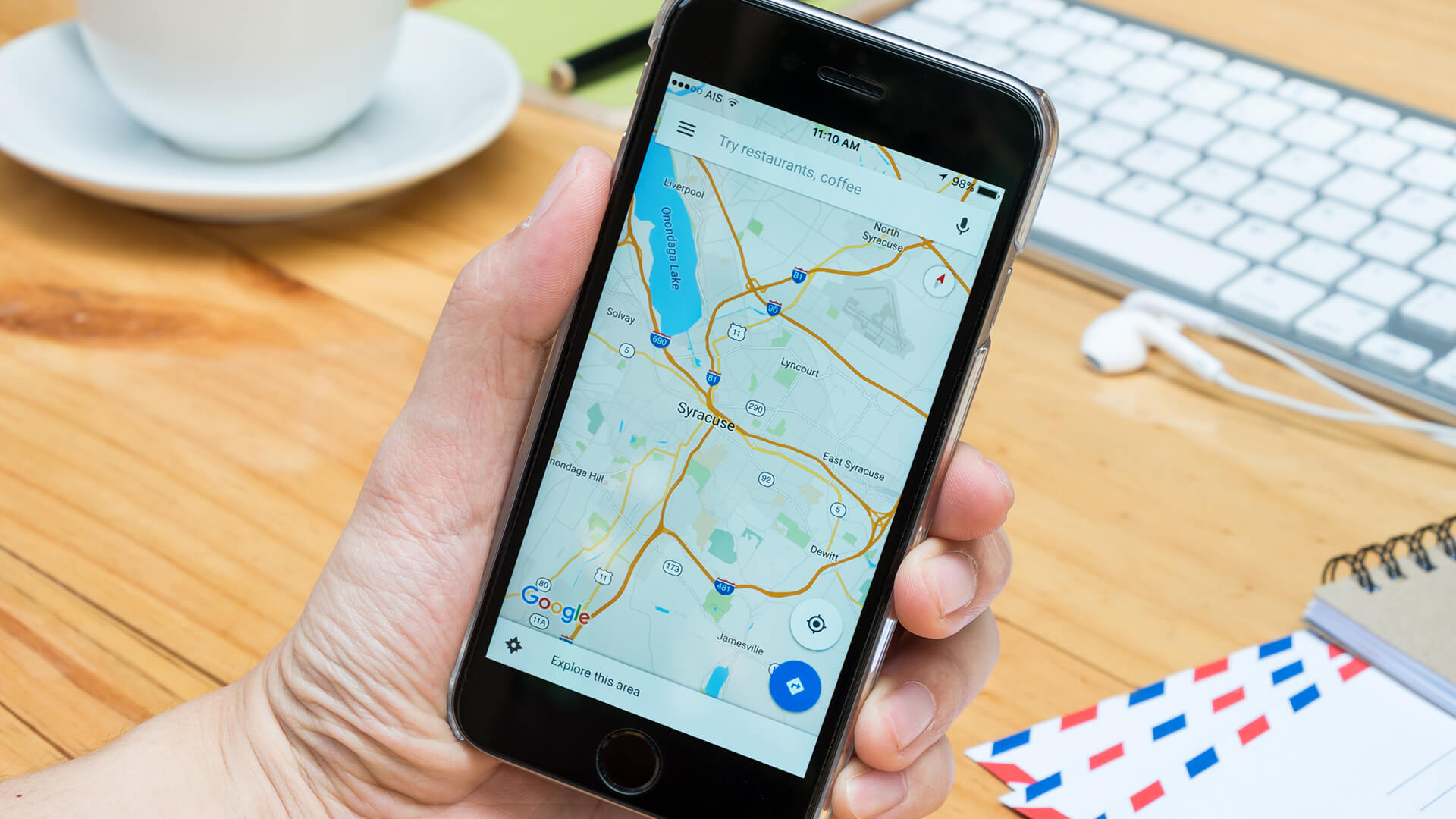
Google Maps will tell you how hard it will be to find parking

Now you can plan enough time not just for driving to your destination but also the time it takes to park at your destination with the Google Maps app.

Google announced that the new version of the Google Maps Android app will now tell you how difficult it is to find parking at your destination. This is based on predictive data, similar to how Google calculates popular times for venues.
Google added this parking difficulty icon for 25 metro areas throughout the US. This is aimed at giving you a heads-up on how much more time you need to plan to get to your destination to include time for parking.
Here is a picture that shows you the parking icon in red at the bottom, showing “limited” parking.
This is available in the following metro areas; San Francisco, Seattle, Miami, Atlanta, Boston, Charlotte, Chicago, Detroit, Los Angeles, Minneapolis/St. Paul, New York City, Orlando, Philadelphia, Pittsburgh, San Diego, St. Louis, Tampa, Washington, DC, Cleveland, Dallas/Fort Worth, Denver, Houston, Phoenix, Portland and Sacramento.
To know more latest update or tips about Search Engine Optimization (SEO), Search Engine Marketing (SEM) - Fill ContactUs Form or call at +44 2032892236 or Email us at - adviser.illusiongroups@gmail.com.
Sunday, 22 January 2017

Former Google search chief Amit Singhal joins Uber

Singhal will become a senior vice president of engineering, overseeing Uber's Maps & Marketplace departments.

What do you do after running Google search for 15 years? For Amit Singhal, it was going to be time off and a focus on his foundation. But now, Google’s former search chief is joining Uber as a senior vice president of engineering overseeing the Map and Marketplace departments.
TechCrunch has a long interview with Singhal and the news. He left Google about a year ago and has been spending time on his foundation to help get promising kids to top schools in India. But with that apparently humming along, it sounds as if Singhal was ready for a new challenge — one that came up after meeting Uber CEO Travis Kalanick.
Singhal said he found the computer science challenge of Uber too interesting to pass up. From what he told TechCrunch:
“This company is not only doing things that are amazing, this company also has some of the toughest computer science challenges that I have seen in my career of 25 years,” Singhal told me. “Those computer science challenges for a computer science geek are just intriguing — you give a geek a puzzle, they can’t drop it; they need to solve the puzzle. That’s how it felt to me.”
Amazingly, he puts the challenge at Uber on par with the challenge of creating a search engine:
“At Uber, this team is actually hiding so much deep science behind a very simple interface of pushing a button and having a car show up,” Singhal explained. “The science that goes on behind that is equally as complex as what we had to do at Google.”
Perhaps the science is deep, and no doubt there are challenges with it, but as complicated as coming up with the right answers to billions of different questions asked and answered each day by Google?
TechCrunch also separately reports that Uber has picked up another former Googler, Kevin Thompson, who was VP of engineering on ads for YouTube. He’ll be the vice president, marketplace engineering, for Uber.
To know more latest update or tips about Search Engine Optimization (SEO), Search Engine Marketing (SEM) - Fill ContactUs Form or call at +44 2032892236 or Email us at - adviser.illusiongroups@gmail.com.

Wednesday, 18 January 2017

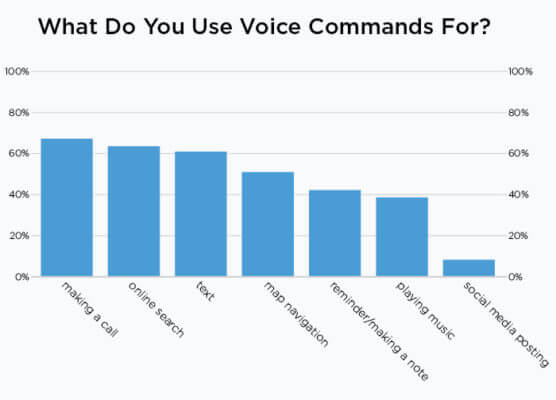
Survey: 60 percent of voice users want more answers and fewer search results

Making calls, searching, texting and map lookups were the most common use cases for voice.

oice search and use of voice commands on mobile devices is on the rise. However, there’s still some embarrassment or reluctance to use it, according to a new survey of more than 900 US smartphone owners from Stone Temple Consulting.
The survey found that people were more likely to use voice when they were alone at home or work. They were much less likely to talk to their devices in public.
Men, younger (and older) users and higher income groups were somewhat more inclined to use voice; however, the differences by category were generally not significant. The exceptions were that men and higher income earners appeared somewhat less inhibited about using voice in public situations.
Ironically, those same high income earners “are more likely to get annoyed by people using voice commands with their phone in public,” although they themselves are more likely to do it as well.
Making a call, searching, texting and map lookups were top use cases. Driving, “hands full” and “hands dirty” were the top contexts for voice, with roughly 60 percent citing these as dominant scenarios. However, the vast majority (80 percent) still preferred to text by hand (this may go to accuracy).
The top three rationales behind voice usage were:
  1. It’s fast.
  2. The answer is read back to me.
  3. I don’t have to type.
About 40 percent of both men and women said that voice made using their smartphones easier. Men were more likely than women to strongly agree. This answer and other data in the survey reflect a mostly positive experience with voice.
Perhaps the most interesting data in the survey findings pointed to the transformation of the search experience with virtual assistants and voice on smartphones. Users wanted more direct answers and fewer conventional search results with their corresponding need to go to third-party websites.
Respondents said they also wanted “more integration with other applications.” That’s a strange response, given that on both the iPhone and Android devices, speech is integrated with third-party apps.
We should see these responses as further indicators of satisfaction with virtual assistants and voice. I wish there were additional data unpacking this response. It’s the one with the most dramatic implications for the search user experience, for marketers and for Google.
To know more latest update or tips about Search Engine Optimization (SEO), Search Engine Marketing (SEM) - Fill ContactUs Form or call at +44 2032892236 or Email us at - adviser.illusiongroups@gmail.com.

Tuesday, 10 January 2017

Keep your customers from cheating on you

Losing customers means you need to find replacement customers, and that gets expensive—fast.

The more you know about your customers, the less chance they’ll go to a competitor.  This white paper from Vision Critical will provide the road-map. Learn how you can:
  • demonstrate your authenticity;
  • uncover hidden, but important truths about your customers;
  • inject timely customer feedback into your product innovation cycle;
  • create more detailed maps of the customer journey
To know more latest update or tips about Search Engine Optimization (SEO), Search Engine Marketing (SEM) - Fill ContactUs Form or call at +44 2032892236 or Email us at - adviser.illusiongroups@gmail.com.