Pages

Showing posts with label GOOGLE SEO SEARCH ENGINE. Show all posts

Friday, 22 September 2017

3 ways to improve link equity distribution and capture missed opportunities

You've worked hard to accumulate as much link equity as possible from external sources, but is your internal linking structure diluting that equity? Columnist Chris Long details how to reclaim your lost link value.

There’s a lot of talk about link building in the SEO community, and the process can be time-consuming and tedious. As the web demands higher and higher standards for the quality of content, link building is more difficult than ever.
However, few SEOs are discussing how to better utilize what they already have. There seems to be an obsession with constantly building more and more links without first understanding how that equity is currently interacting with the website. Yes, more links may help your website rank better, but your efforts may be in vain if you’re only recouping a small portion of the equity. Much of that work dedicated to link-building efforts would then be wasted.
For many websites, there is a big opportunity to improve upon the link equity that has already been established. The best part about all of this is that these issues can be addressed internally, as opposed to link building which typically requires third-party involvement. Here are some of my favorite ways to reclaim lost link value.

1. Redirect old URL paths

On client websites, I often see discontinued product pages that haven’t been redirected or entire iterations of old websites where almost all of the URLs are returning 404 errors. Leaving these pages broken leaves too much unused link equity on the table.
Finding old URL paths and 301 redirecting them can lead to huge wins in search engine visibility. In one fell swoop, you can reactivate the value of hundreds or even thousands of links that are pointing toward your domain.
So the question becomes, how can you surface these old URLs?
There are a few different methods I use, depending on the resources I have at hand. Occasionally, I’ve had clients who just went through a migration that moved their old website to a staging site. If this is the case, you should be able to configure Screaming Frog to crawl the staging environment (you may need to ignore robots.txt and crawl nofollow links). After the crawl is complete, simply export the data to a spreadsheet and use Find/Replace to swap out the staging domain with the root domain, and you should have a comprehensive list of old URL paths.
However, what if you don’t have access to any resources that list old URLs? For these situations, I use a combination of Ahrefs, Google Analytics and Google Search Console (credit to Dan Shure’s article on redirect chains, which helped me refine this process).
First, using Ahrefs, I’ll enter my domain, and then click the “Best Pages By Links” report.
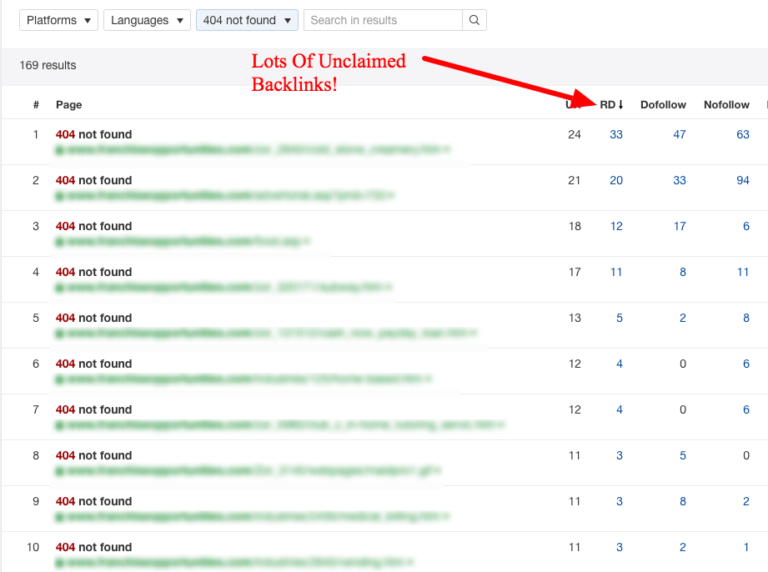
From there, I export the entire report into an Excel file. It’s important that you export all of the URLs Ahrefs gives you, not just the ones it identifies as 404 errors. Ahrefs will only provide the initial status code the URL returns, which can be misleading. Often, I’ll see situations where Ahrefs identifies the status code as a 301, but the URL actually redirects to a 404.
Once I have my Excel file, I run the URLs through Screaming Frog using “List Mode” and export the 404 errors it finds into a master Excel document.
Next, I go to Google Analytics and navigate to the “Landing Pages” report. I’ll typically set the date ranges for as far back as the account tracks, but this varies for each situation. I’ll export all of the data it gives me to a spreadsheet and then add the domain name in front of the relative URL path using Excel’s CONCATENATE function.
I once again run this list through Screaming Frog and add the 404 errors it finds to the master document.
Finally, I log in to Google Search Console, open up the “Crawl Errors” report, and navigate to the “Not Found” tab. I export these URLs and confirm that they do, in fact, return 404 status codes by using Screaming Frog. I add these 404 pages to the master document.
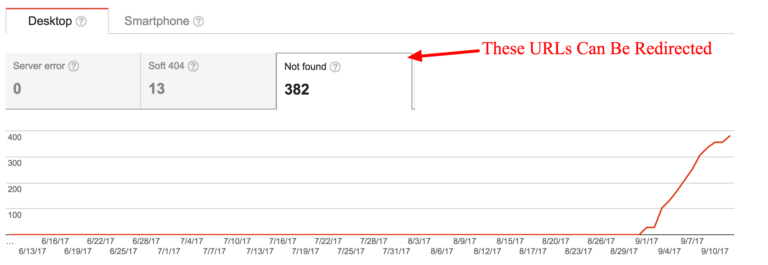
Now there’s one master spreadsheet that contains all of the potential broken URLs in one place. De-dupe this list and run Screaming Frog in “List Mode” and export the URLs that return 404 status codes.
To help prioritize which URLs to redirect first, I connect Screaming Frog to the Ahrefs API, which will allow the crawler to gather the link metrics associated with each page. I sort that list by number of linking root domains and assign priority to the redirections that way.
After I have the final list of 404 errors, it’s simply a matter of identifying the destination pages on the client website each URL should redirect to. To scale this effort, I often use a combination of MergeWords and the OpenList Chrome extension.

2. Analyze the .htaccess file

When evaluating how your website distributes link equity, it’s important to understand how your global redirects are working as well. This is where the .htaccess file comes into play. In this file, you can see the syntax that instructs your website how to handle redirect rules.
When using a tool like Ahrefs, if I’m seeing common redirect patterns, this is a good sign that these rules are defined in the .htaccess file.
Often, I’ll see that the .htaccess file is causing 302 redirects that should be 301, pushing unnecessary redirects (causing redirect chains), or missing redirect rules that should be there. For instance, a common mistake I see are files that 302 redirect HTTP URLs to HTTPS instead of 301.
Each situation is entirely different, but here are some of the .htaccess rules I commonly look for:
  • “HTTP” to “HTTPS” rules
  • Non-WWW to WWW rules
  • URL capitalization rules
  • Trailing slash rules
There are many opportunities to better control the directives of the .htaccess file. If you’re noticing similar patterns of improperly configured redirects, it may be worth pulling this file and talking to your developers about how these issues can be fixed.

3. Fix internal 301 redirects

Now that you’ve accumulated as much link equity as possible from external sources, it’s time to ensure that your website is passing it efficiently internally. If your website has a bunch of internal 301 redirects, there’s a chance that your deeper pages may not be receiving as much link equity as they possibly could be. While Google claims there is no link equity lost in 3xx redirects, why leave this up to chance? I would rather be 100 percent sure that internal links are passing their full value throughout the website.
To identify these, I run Screaming Frog in “Spider Mode” on the domain being analyzed. Screaming Frog will crawl the website and gather instances of 301 redirects in the “Redirection (3xx)” report. If you want to determine the order of importance, sort this report by “Inlinks.” You will now see the pages that are internally 301 redirecting the most.
Often, these are instances of internal redirects in key areas such as the primary/secondary navigation, footer or sidebar links. This is great because with one change, you can eliminate a large quantity of these internal 301 redirects. While you’ll want to fix as many as possible, I recommend you start there.

Final thoughts

One thing I’ve learned during my time as an SEO is that webmasters are fantastic at diluting equity. Changes such as website migrations and previous URL redirects all have a large impact on link equity.
While in an ideal world link equity would be kept in mind during these implementations, that is often not the case. The above steps should serve as a good starting point to getting some of yours back.

Some opinions expressed in this article may be those of a guest author and not necessarily Search Engine Land. Staff authors are listed here.

 know more latest update or tips about Search Engine Optimization (SEO), Search Engine Marketing (SEM) - Fill ContactUs Form or call at +44 2032892236 or Email us at - adviser.illusiongroups@gmail.com. 

Wednesday, 7 December 2016

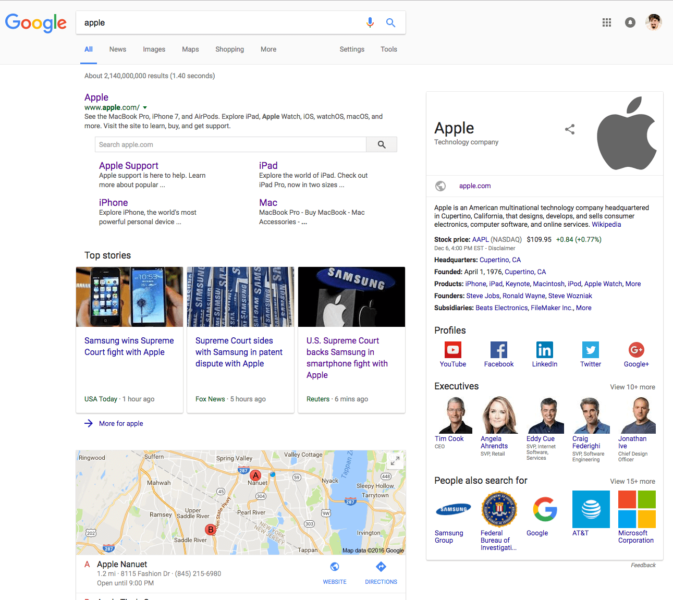
Google begins rolling out a new desktop search user interface

Check out the new desktop search interface rolling out to a Google near you.


Google has confirmed with Search Engine Land that they have begun rolling out a new design and look for their desktop search results page. The new design has a more boxy look resembling a mobile user interface.
I believe the official rollout began yesterday, but I spotted tests of this new design a few weeks ago.
Here is a screen shot of the new design:


It is unclear how long this new design will take to full roll out to all searchers, but I am personally able to replicate this across dozens of desktop browsers and operating systems.
To know more latest update or tips about Search Engine Optimization (SEO), Search Engine Marketing (SEM) - Fill ContactUs Form or call at +44 2032892236 or Email us at - adviser.illusiongroups@gmail.com

Thursday, 1 December 2016

Gartner CMO Spend Survey: Marketing budgets continue to rise

According to Gartner’s 2016–2017 Chief Marketing Officer (CMO) Spend Survey, marketing budgets increased to 12 percent of company revenue in 2016, from 11 percent in 2015. Fifty-seven percent of marketing leaders surveyed expect their budgets will increase further in 2017. However, 14 percent of marketers say they are bracing for budget cuts, up from 3 percent just two years ago.
The survey took place in July and August 2016 and includes responses from 377 marketers at companies with more than $250 million in annual revenue in North America and the UK. This marks the fifth year that Gartner has surveyed marketers on spending priorities and marketing operations.
Read the results and analysis today. Vist Digital Marketing Depot to get your copy.
To know more latest update or tips about Search Engine Optimization (SEO), Search Engine Marketing (SEM) - Fill ContactUs Form or call at +44 2032892236 or Email us at - adviser.illusiongroups@gmail.com

Wednesday, 9 November 2016

Google Safe Browsing “Repeat Offenders” will get a 30-day time-out

Do you continue to violate Google's safe browsing policies? Well, Google is about to get stricter on you.


Google announced on the their security blog that they have a new type of violation notice for webmasters named “Repeat Offenders” for safe browsing issues.
This notification is aimed at “websites that repeatedly switch between compliant and policy-violating behavior for the purpose of having a successful review and having warnings removed,” Google said.
Google will notify the webmaster of this manual action via Google Search Console, but the webmaster will not be able to request a reconsideration request for 30-days. This 30-day waiting period is to encourage these repeat offenders to not repeat the same offense over and over again by forcing them to wait, with a manual action, for 30 full days.
Google Safe Browsing aims at helping protect Google users by showing warnings on dangerous sites or dangerous download files. “Safe Browsing also notifies webmasters when their websites are compromised by malicious actors and helps them diagnose and resolve the problem so that their visitors stay safer,” Google writes.
Sites that repeatedly switch between compliant and noncompliant behavior within a short window of time will be classified as Repeat Offenders.
When a site is established as a Repeat Offender, the webmaster will be notified via email to their registered Search Console email address. Once Safe Browsing has designated a site as a Repeat Offender, the webmaster will be unable to request additional reviews via the Search Console. Repeat Offender status persists for 30 days, after which the webmaster will be able to request a review.
The user who tries to access the site will also see the warning until the violation is removed, which will be for 30-days or more.
To know more latest update or tips about Search Engine Optimization (SEO), Search Engine Marketing (SEM) - Fill ContactUs Form or call at +44 2032892236 or Email us at - adviser.illusiongroups@gmail.com 

Tuesday, 8 November 2016

Google officially drops the Knowledge Graph snippet overlays over low usage

After 2 1/2 years, Google has dropped the search snippet feature.


Google has confirmed with Search Engine Land that they have removed the Knowledge Graph snippet overlays or drop-down menus from the search results. The feature was removed “due to low usage,” a Google spokesperson has told us. Google told us they have “retired this feature” since it was not used as often as they would have liked.
The Knowledge Graph popup in the snippets first launched in January 22, 2014. So after two and a half years, Google decided to drop the feature.
Here is a screen shot of what the feature looked like and did:
google-knowledge-graph-overlay
It was first noticed as being removed by RankRanger on November 3, 2016.

To know more latest update or tips about Search Engine Optimization (SEO), Search Engine Marketing (SEM) - Fill ContactUs Form or call at +44 2032892236 or Email us at - adviser.illusiongroups@gmail.com 

Reference taken by - SearchEnginLand

[Reminder] Live webcast: It’s Not Too Late! Maximize Your Google Shopping in Time for the Holidays

Black Friday and Cyber Monday are just weeks away. Are you getting the most out of your Google Shopping campaigns?

Whether you’re a beginner or a paid search pro, it’s not too late to improve your Google Shopping campaigns in time for the holidays. Join us for this November 10 webcast and learn how to optimize for search success with Google Shopping ads. Our expert panel will discuss:
  • how to create “quick wins” in your Shopping account;
  • how to combine paid search with Shopping campaigns for better results;
  • more effective use of product pricing in your Shopping strategy;
  • and more.  
To know more latest update or tips about Search Engine Optimization (SEO), Search Engine Marketing (SEM) - Fill ContactUs Form or call at +44 2032892236 or Email us at - adviser.illusiongroups@gmail.com 

Reference taken by - SearchEnginLand

Sunday, 9 October 2016

PPC + SEO = match made in marketing heaven

Are your SEO and PPC teams working in silos? Columnist Julian Connors discusses several ways SEO and PPC can combine efforts to improve their strategies and drive more conversions.


It has been quite a year for the Search Engine Results Page (SERP).
We’ve seen numerous algorithm updates, including a final Penguin update and the introduction of Possum. We also saw major changes to the way ads are displayed on desktop SERPs. Google continues to tweak how online consumers receive content through organic and paid listings.
In order to meet the demands of today’s search landscape and connect with more qualified consumers, strategists need to create campaigns that treat SEO and PPC as a unified silo, as opposed to separate disciplines.

Google’s never-ending quest for SERP perfection

The ongoing adjustments to the SERP layout are meant to help Google better align with consumer objectives by improving the content quality and relevance of listings.
While this certainly allows Google to become a better service provider for online consumers, it also presents new challenges for SEO strategists. Each adjustment requires strategists to develop new methods for ranking within prime search listings.

Integrating SEO with PPC

Developing digital marketing campaigns that combine SEO with PPC is not only necessary for achieving prime listing positions, it’s now the only way to maximize traffic and conversion opportunities.
As the former Organic Search Manager for Procter & Gamble’s Home Care division, I was responsible for developing comprehensive, complex digital campaigns that focused on consumer behavior alignment and conversion optimization.
When our team made the effort to combine both SEO and PPC strategies/data, we were able to identify a multitude of critical data points dedicated to consumer behavior, intentions and location/geography.
This level of precision allowed us to:
  • modify our organic keyword strategy so that we could create and optimize new content to rank within specific geographic locations, applying exact phrases used by our target audience to align with their intentions;
  • adjust our PPC budgets so that we were only running ads within the most popular markets and effective time frames; and
  • align our PPC ads with P&G’s offline marketing schedule to maximize awareness and conversions.
Overall, these actions resulted in:
  • 30-percent increase in organic traffic
  • 25-percent increase in paid clicks
  • 35-percent savings in ad spend
  • 20-percent increase in quarterly profits

Sharing information to create one rockstar team

Most digital marketing agencies are built with SEO and PPC sitting on opposite sides of the building.
Both teams work tirelessly, developing keyword strategies, creating unique content and employing a number of tactics that focus on attracting online consumers. Even though each team uses different systems and tactics to drive conversions, there is a tremendous amount of critical data that can be used to create a synergistic and harmonious relationship, bolstering results for everyone.
Check out the following ways that SEO and PPC can combine efforts to improve their strategies, as well as to drive conversions like never before.

Share keyword data to increase the intelligence of your campaigns

Keywords are the foundation for any successful SEO or PPC campaign.
For PPC strategists, keywords are used to facilitate creative relationships with consumers who are located further down the conversion funnel.
In the world of SEO, keywords are used to dictate the information architecture of a website, as well as its content strategy.
Both teams conduct keyword research in order to identify terms that align with their target audience’s online behavior, project traffic growth and drive qualified conversions.
Because more consumers are using long-tail phrases and complete sentences when searching than ever before, keyword data must be shared across both teams in order to offer coordinated messages that keep brands top-of-mind and solicit qualified conversions.

Set shared goals and combine metrics

Using the information both teams collect doesn’t just offer more accuracy around consumer behavior; it can also be used to support your brand’s inbound marketing campaigns.
Teams that combine their PPC data with organic user engagement metrics (e.g., average session duration, bounce rate, pages per session) are able to gain unique insight around how consumers are interacting with certain digital properties, as well as how they behave once they leave your site.
The metrics your SEO and PPC teams review in order to establish their key performance indicators (KPIs) should be almost identical. When this happens, you are able to apply this information to other marketing channels like PR, social media or email marketing.

Remove silos to improve production

Approaching SEO and PPC as two separate silos isolates critical information and diminishes the productivity level of even the most well-executed online campaigns.
It almost never makes sense to keep these two disciplines apart, as the teams can offer each other particular points of information that are vital for identifying and fulfilling conversion opportunities.

Use data that informs cross-channel decisions and justifies action

When it comes to gathering enough actionable data to develop robust, intelligent strategies, extracting information from one specific field, like SEO or PPC, is not enough.
Although the quality of your organic data may provide insight on how to create functional plans, the amount of verified information organic search can capture may not be sufficient to justify real action.
Conversely, information that’s gathered from the search engines themselves as a result of paid search activity is both valuable and based on a substantial sample size that allows you to move forward confidently.
If your organization treats SEO and PPC as two distinct entities, try to make sure that your efforts are aligned through shared:
  • reporting;
  • objectives; and
  • communication portals.
The goal of merging both disciplines together is not to have the same people performing the same type of work. Instead, it is meant to increase internal awareness of key conversion opportunities.

Action & impact: how to maximize SERP visibility

Now that we have covered the principles that allow your SEO and PPC teams to work together efficiently, use the following tactics to own as much real estate within Google SERPs as possible.

Landing page optimization

Optimizing your landing pages to drive qualified traffic and conversions is a fundamental component of any digital marketing campaign. SEO strategists can provide their PPC counterparts with critical information around consumer intentions, objectives and demands to reduce bounce rate andincrease click-through-rates (CTR).
PPC strategists can then use their insights around consumer online activity to perpetuate paid ads that only appear in front of the most qualified consumers possible. By doing this, both teams are able to support each other in ways that improve user experience, maximize relevant traffic and reduce wasted ad spend.

Approach SEO & PPC holistically

Running paid ad campaigns that 1) offer precise messages and 2) are located next to your organic listings on Google can increase overall CTR and lead to a higher return on your investment.
While managing the online campaign of Sonos in 2015, our team ran paid ads alongside keywords that the electronics company already ranked for organically. This type of positioning was extremely effective for creating the sense that we were more prominent than our competitors and thus, more credible.
Because of this, total revenue through organic and paid channels increased by 37 percent year over year.

Understand seasonality

Share seasonal data and information relating to other offline variables to learn how to approach and optimize for specific times throughout the year when consumer activity peaks.
Use this information to create a calendar of events that guides you on how to:
  • create organic content that aligns with specific consumers within specific locations;
  • run paid ads that contain unique messaging based on location and intention;
  • maximize brand awareness during peak activity points like the holiday shopping season; and
  • increase consumer reaction and conversions during seasonal low points.

Get in front of the competition

SEO and PPC strategists should work together as a cohesive unit to share key points of information that highlight how and what the competition is doing from a digital perspective.
Create monitoring systems that identify your competitors in terms of:
  • positioning within SERPs;
  • pricing;
  • key message points/branding initiatives; and
  • primary and secondary keyword terms.
Use this information to adjust your ad spend, to improve CTR and to outrank your opponents by taking up more real estate within SERPs.
To know more latest update or tips about Search Engine Optimization (SEO), Search Engine Marketing (SEM) - ContactUs or call at +44 2032892236
Referece taken by - SearchEnginLand