Pages

Showing posts with label LINK BUILDING. Show all posts

Friday, 22 September 2017

3 ways to improve link equity distribution and capture missed opportunities

You've worked hard to accumulate as much link equity as possible from external sources, but is your internal linking structure diluting that equity? Columnist Chris Long details how to reclaim your lost link value.

There’s a lot of talk about link building in the SEO community, and the process can be time-consuming and tedious. As the web demands higher and higher standards for the quality of content, link building is more difficult than ever.
However, few SEOs are discussing how to better utilize what they already have. There seems to be an obsession with constantly building more and more links without first understanding how that equity is currently interacting with the website. Yes, more links may help your website rank better, but your efforts may be in vain if you’re only recouping a small portion of the equity. Much of that work dedicated to link-building efforts would then be wasted.
For many websites, there is a big opportunity to improve upon the link equity that has already been established. The best part about all of this is that these issues can be addressed internally, as opposed to link building which typically requires third-party involvement. Here are some of my favorite ways to reclaim lost link value.

1. Redirect old URL paths

On client websites, I often see discontinued product pages that haven’t been redirected or entire iterations of old websites where almost all of the URLs are returning 404 errors. Leaving these pages broken leaves too much unused link equity on the table.
Finding old URL paths and 301 redirecting them can lead to huge wins in search engine visibility. In one fell swoop, you can reactivate the value of hundreds or even thousands of links that are pointing toward your domain.
So the question becomes, how can you surface these old URLs?
There are a few different methods I use, depending on the resources I have at hand. Occasionally, I’ve had clients who just went through a migration that moved their old website to a staging site. If this is the case, you should be able to configure Screaming Frog to crawl the staging environment (you may need to ignore robots.txt and crawl nofollow links). After the crawl is complete, simply export the data to a spreadsheet and use Find/Replace to swap out the staging domain with the root domain, and you should have a comprehensive list of old URL paths.
However, what if you don’t have access to any resources that list old URLs? For these situations, I use a combination of Ahrefs, Google Analytics and Google Search Console (credit to Dan Shure’s article on redirect chains, which helped me refine this process).
First, using Ahrefs, I’ll enter my domain, and then click the “Best Pages By Links” report.
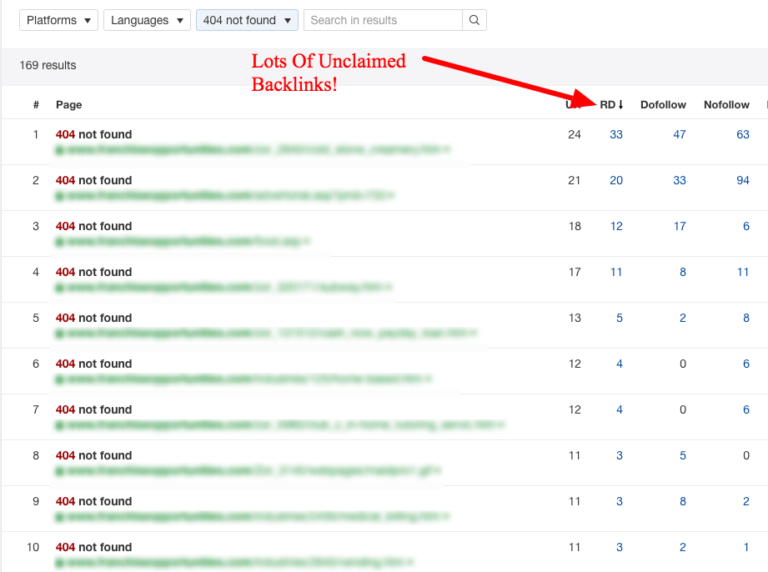
From there, I export the entire report into an Excel file. It’s important that you export all of the URLs Ahrefs gives you, not just the ones it identifies as 404 errors. Ahrefs will only provide the initial status code the URL returns, which can be misleading. Often, I’ll see situations where Ahrefs identifies the status code as a 301, but the URL actually redirects to a 404.
Once I have my Excel file, I run the URLs through Screaming Frog using “List Mode” and export the 404 errors it finds into a master Excel document.
Next, I go to Google Analytics and navigate to the “Landing Pages” report. I’ll typically set the date ranges for as far back as the account tracks, but this varies for each situation. I’ll export all of the data it gives me to a spreadsheet and then add the domain name in front of the relative URL path using Excel’s CONCATENATE function.
I once again run this list through Screaming Frog and add the 404 errors it finds to the master document.
Finally, I log in to Google Search Console, open up the “Crawl Errors” report, and navigate to the “Not Found” tab. I export these URLs and confirm that they do, in fact, return 404 status codes by using Screaming Frog. I add these 404 pages to the master document.
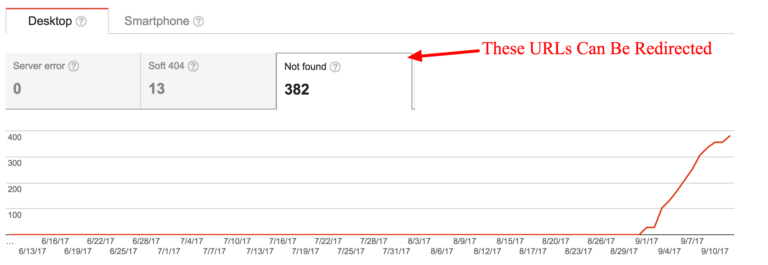
Now there’s one master spreadsheet that contains all of the potential broken URLs in one place. De-dupe this list and run Screaming Frog in “List Mode” and export the URLs that return 404 status codes.
To help prioritize which URLs to redirect first, I connect Screaming Frog to the Ahrefs API, which will allow the crawler to gather the link metrics associated with each page. I sort that list by number of linking root domains and assign priority to the redirections that way.
After I have the final list of 404 errors, it’s simply a matter of identifying the destination pages on the client website each URL should redirect to. To scale this effort, I often use a combination of MergeWords and the OpenList Chrome extension.

2. Analyze the .htaccess file

When evaluating how your website distributes link equity, it’s important to understand how your global redirects are working as well. This is where the .htaccess file comes into play. In this file, you can see the syntax that instructs your website how to handle redirect rules.
When using a tool like Ahrefs, if I’m seeing common redirect patterns, this is a good sign that these rules are defined in the .htaccess file.
Often, I’ll see that the .htaccess file is causing 302 redirects that should be 301, pushing unnecessary redirects (causing redirect chains), or missing redirect rules that should be there. For instance, a common mistake I see are files that 302 redirect HTTP URLs to HTTPS instead of 301.
Each situation is entirely different, but here are some of the .htaccess rules I commonly look for:
  • “HTTP” to “HTTPS” rules
  • Non-WWW to WWW rules
  • URL capitalization rules
  • Trailing slash rules
There are many opportunities to better control the directives of the .htaccess file. If you’re noticing similar patterns of improperly configured redirects, it may be worth pulling this file and talking to your developers about how these issues can be fixed.

3. Fix internal 301 redirects

Now that you’ve accumulated as much link equity as possible from external sources, it’s time to ensure that your website is passing it efficiently internally. If your website has a bunch of internal 301 redirects, there’s a chance that your deeper pages may not be receiving as much link equity as they possibly could be. While Google claims there is no link equity lost in 3xx redirects, why leave this up to chance? I would rather be 100 percent sure that internal links are passing their full value throughout the website.
To identify these, I run Screaming Frog in “Spider Mode” on the domain being analyzed. Screaming Frog will crawl the website and gather instances of 301 redirects in the “Redirection (3xx)” report. If you want to determine the order of importance, sort this report by “Inlinks.” You will now see the pages that are internally 301 redirecting the most.
Often, these are instances of internal redirects in key areas such as the primary/secondary navigation, footer or sidebar links. This is great because with one change, you can eliminate a large quantity of these internal 301 redirects. While you’ll want to fix as many as possible, I recommend you start there.

Final thoughts

One thing I’ve learned during my time as an SEO is that webmasters are fantastic at diluting equity. Changes such as website migrations and previous URL redirects all have a large impact on link equity.
While in an ideal world link equity would be kept in mind during these implementations, that is often not the case. The above steps should serve as a good starting point to getting some of yours back.

Some opinions expressed in this article may be those of a guest author and not necessarily Search Engine Land. Staff authors are listed here.

 know more latest update or tips about Search Engine Optimization (SEO), Search Engine Marketing (SEM) - Fill ContactUs Form or call at +44 2032892236 or Email us at - adviser.illusiongroups@gmail.com. 

Monday, 4 September 2017

5 steps to creating a more efficient link-building campaign

Contributor Jeremy Knauff shares the steps his agency takes, and the tools they use, to create a structured and efficient link-building process.

Link building plays a critical role in SEO today, but despite its importance, many people still approach this component haphazardly. They enthusiastically jump in with both feet, but without a structured process, they fail to achieve the results they could.
In the past, I’ve taken both approaches: I’ve run some link-building campaigns with little to no structure, and I’ve run others with enough structure to make German engineers weep with joy.
I can tell you from firsthand experience that the latter results in a more efficient campaign every single time. Meanwhile, that efficiency leads to better results for your clients and higher profit margins for you. So today, I’m going to share five steps you can use to make your link-building campaigns more efficient.

Start with a plan

I once had a client who, despite having the best of intentions, reminded me of a squirrel who had just guzzled a double espresso. Each time we would develop a detailed marketing plan working toward his goals, he would tell us how much he loved everything, sign off on it, and then within a few weeks, decide that he wanted to focus on some new shiny goal. As you might imagine, this absolutely killed his progress.
Fortunately, he recently stepped down, and the new CEO bases his marketing programs on a plan rather than a whim.
Planning is not a luxury. It’s a necessity that keeps you on track, improves performance and helps you reach your goals more quickly and efficiently because it reduces wasted time and energy.
Think of it in the context of travel. How efficient do you think you would be if you just hopped in your car and started driving with no route in mind, no GPS or map, and only a destination with no plan on how to get there? It’s pretty safe to assume that it would not be an efficient trip, and that’s if you even made it to your destination at all!
You need to develop a detailed link-building plan to maximize your results. It’s not just a numbers game, so by determining exactly what you want to accomplish and outlining the steps necessary to do so, you’ll achieve far greater results, and you’ll do so more quickly.

Focus on a tighter niche

Most SEO professionals today understand the importance of relevance in their link-building campaigns, and I would take this approach a step further. Rather than going after any and every link that is relevant to your content, you should further refine your strategy to go after links from a smaller niche within that pool of relevant websites. That may sound limiting, but hear me out.
Let’s say you’re building links for an architectural firm. Obviously, links from home builders, commercial contractors and engineers would all be relevant, but they would each link to an architectural firm for their own particular reasons — so the content you would need to create to earn those links would be different in each case. Having to create all of these distinct types of content is relatively inefficient.
On the other hand, if you create some amazing content that appeals to home builders, and then systematically conduct outreach targeting that type of site, your workflow will be both more efficient and more productive. You’ll also likely develop contacts who know each other, which come into play later.
Speaking of workflow…

Follow a process

Jumping from activity to activity is a recipe for disaster because it reduces efficiency and makes it more difficult to measure and reproduce results. That’s why an assembly line is so much more efficient than one person building something from start to finish.
When my team builds links, we follow a well-documented process that starts with thorough planning. We will first identify a strategic goal, and then determine what topics we need to rank for to achieve that goal.
From there, we start planning our topics for the next four to 12 months, including core pages as well as blog posts. Next, we identify the ideal websites we want to earn links from and compile their information. Finally, we conduct outreach, build relationships and follow up until we’ve earned those links for our client.
Following a documented process not only helps us produce better results for our clients more quickly, it also helps us to scale our agency more effectively because we can bring new employees on board and get them productive faster.

Document your campaigns

Documenting the work you put into your link-building campaigns makes it easier for teams to effectively work together because everyone has real-time access to tasks and their statuses, any necessary files and a log of all communications, both internal and external. Even if you work alone, this is still a valuable step because it helps you to consistently reproduce results.
We use a project management system called Teamwork and a customer relationship management (CRM) system called Hubspot to do this, and when integrated with Gmail, we can log literally every single email we send without any extra effort. We also use Boomerang for Gmail to automatically remind our team to follow up if we don’t receive a reply within a specified time frame. (Of course, there are many project management and CRM tools available, and you should invest some time evaluating which work best for your needs, situation and workflow. What is best for my team might not be best for you.)
One of the most powerful features of using a CRM to document your link-building efforts is that you can assign contacts to specific campaigns and even apply tags so that you can categorize, track and report on your efforts.
This means that if I need a list of people with whom we have an existing relationship (because they have linked to our clients before), I can quickly and easily pull a list and connect. We’re far more likely to earn a link from one of these people than we would with a cold email to a stranger, so this can be a huge productivity booster.
These tools aren’t solely effective for existing relationships, though. The vast majority of your initial cold emails will be ignored or declined, but a CRM allows you to set reminders to follow up with link prospects. That way, over time, you can develop and nurture a relationship that makes it easier to eventually earn links from them in the future.
There is both art and science to doing this well, which is covered in a piece on Marketing Land called How to get your content amplified by influencers.
And once you’ve built those relationships…

Leverage your contacts

We’ve already talked about how you can use your CRM to repeatedly go back to the well for new links from existing contacts, but there’s another opportunity that few people take advantage of, and that is to leverage those contacts to earn introductions to new contacts.
We start by first running a crawler, like Screaming Frog, on their website to identify outbound links, and then sort the resulting data to identify potential link opportunities. From there, it’s a simple matter of asking your contact for an introduction via email. You might try something like this:
“Hey Alex, I wanted to ask a quick favor. I noticed you have a link to xyz.com — do you know someone over there? If so, could you introduce me to them? Since we cover similar topics, I think we would be good contacts for each other.”
It’s important to point out that this approach will only be effective if you’ve previously been in dialogue with a contact. Ideally, someone who already owes you a favor. This is another situation where the tactics outlined in the “how to get your content amplified by influencers” article come into play, because you’ll achieve far better results if you build a relationship with someone and do them a favor first — before you need something from them.
After an introduction has been made, you can pitch the content you want them to link to. After nurturing the relationship, you can also use this same approach to meet that new person’s contacts.
know more latest update or tips about Search Engine Optimization (SEO), Search Engine Marketing (SEM) - Fill ContactUs Form or call at +44 2032892236 or Email us at - adviser.illusiongroups@gmail.com.

Wednesday, 21 December 2016

Link campaigns: Strategy development and review

Whether you're planning to pursue links in 2017 or continue an existing link-building project, columnist Andrew Dennis reminds us that December is an ideal month to review your link campaign strategy.

Link campaigns need strategy.
Link building is a difficult, time-consuming process that doesn’t produce results overnight. However, strategic link acquisition is necessary to achieve long-term improvements in organic search.
It’s possible to grab “quick win” links here and there (and I’d encourage pursuing these opportunities), but you will need an ongoing campaign to achieve sustainable results.
A campaign model ensures research, strategy development and ongoing review and analysis as a project progresses.
Whether you’re planning to pursue links in 2017 or continue an existing link-building project, December is an ideal month to review your link campaign strategy and prepare for the new year.
December is a slow month for link building, with many people checked out for the holidays — either mentally, physically or both. Rather than sending outreach messages that return out-of-office auto-replies, you can work on your campaign strategy for the coming year.
My recommendation is to start planning, strategizing and organizing your link campaign now.
To prepare for your link campaign and piece together a link strategy:
  1. Perform an SEO audit.
  2. Review current links.
  3. Analyze competitors.
  4. Prospect for fresh links.
These four pillars of research and analysis will dictate strategy and lead to success in your link-building campaign.

1. Perform an SEO audit

Website audits should be the foundation of your entire SEO strategy; they are critical for successful link campaigns.
Not only will an audit be beneficial in planning your campaign, but it’s important to audit your site periodically to ensure there aren’t any new or lurking issues hampering performance.
A site audit should reveal:
  • technical issues: crawling/indexation issues, slow page speed, schema issues, title tags, H1/2/3s, meta descriptions and so on.
  • internal linking opportunities: as part of an effective link-building strategy.
  • issues caused by redesigns or migrations: 404s, 302s, redirect chains, site architecture issues, orphaned pages, images vs. text and so on.
  • forgotten or undervalued pages: potential linkable assets (pages that serve as a resource to your audience) that could fuel your next campaign.
  • content gaps and opportunities: gaps in your on-site content where potential exists for linkable asset creation.
Links may not help your website if you have ongoing technical or on-page SEO issues.
Even if you secure hundreds of quality links, but Google isn’t crawling your site, those links won’t impact search traffic.
There are a number of great tools designed to help you understand the technical performance of your site, such as:
  • Raven Site Auditor
  • MySiteAuditor
  • SEOptimer
  • Seomator
If you’re new to SEO or have never audited your own site, there are a few guides that will help you understand the process:
  • The definitive SEO audit (Part 1 of 3) by Dave Davies
    • Part 2
    • Part 3
  • How To Do Your Own 5-Minute SEO Audit by Tom Schmitz
  • SEO Audit Checklist for 2016 by Nathan Gotch
  • How to Perform the World’s Greatest SEO Audit by Steve Webb
Regardless, you should audit your site regularly to ensure it is performing properly and receiving the maximum value of your links.

2. Review current link strategy and sources

Before you can optimize your link campaign, you need to understand how you’ve secured links in the past, and which pages appeal most to your audience/niche. This is true for both new and existing campaigns.
If you’re launching a new campaign, you’ll have to dig into your backlink profile. For an existing campaign, the data should be contained within your own reports — although you should review your site’s backlink profile, too. Either way, analyze your links and ask yourself questions like these:
  • What types of sites link the most?
  • Which types of pages on our site have the most links?
  • What empowered our link acquisition? What led to links?
  • Which tactics fell short or had unexpected outcomes?
  • What was the average turnaround time on securing a link, from initial prospecting to the link going live?
  • Are there any relationships that could be leveraged in the future?
  • Are there prospects that didn’t link that might be worth contacting again in a future campaign?
Whether you’re currently building links or are planning a new initiative, there is important information to be gleaned from your website’s backlink profile.
Reviewing past strategies and analyzing results should be a part of your link-building process. You should always examine your site’s backlinks through backlink analysis to inform your link campaign.
The information will help you build links efficiently and effectively.

3. Analyze your search competitors

Competitive analysis is a cornerstone of any strategy development.
Reviewing the current competitive search landscape will inform your link campaign and help you understand why competitors are ranking in search and where you’re falling short.
Competitive analysis will also help you set reasonable expectations and project goals, as well as find new link opportunities.
During competitive analysis, evaluate and identify the following:
  • How many fresh links your competitors have
  • How competitor backlink profiles compare to your own
  • Common and successful strategies and tactics
  • Potential tactics you could implement in the future
  • Relevant link opportunities
  • Shifts in the competitive landscape and marketplace
  • Broken links pointing to competitors
  • New industry relationships and affiliations
Competitive analysis is critical to successful link projects, and it should be revisited at least once a year (Often, competitive analysis is ongoing throughout a campaign).
Search competition never ends. The web is a quickly evolving, always-shifting environment. Even as you secure more links and gain in search visibility and traffic, your competition also grows and fluctuates. And there are always additional search terms to target. No successful business is stagnant, and neither is SEO and link building.
Here are a few great posts that break down search competitive analysis in detail:
  • How To Compile A Top-Notch Competitive Analysis For Search by Brian Harnish
  • Competitive Link Building Analysis For Your Industry by Patrick Stox
  • Using Competitive Links To Inform Your SEO Strategy by Casie Gillette
  • 31 Link Building Tactics Discovered From Competitive Analysis by Kaila Strong
  • Link Building – Competitor Analysis Case Study by Chris Dyson
  • Determining Search Competitors – Tutorial Tuesday by Cory Collins
Conducting regular analysis on the competition helps you stay ahead of competitor tactics and ensures your campaigns remain strategic.

Prospect for fresh link opportunities

December is a great month to prospect for link opportunities in 2017, with the slow reply rate during the holiday season.
Of course, you shouldn’t abandon any current work, but because it’s hard to reach people in December, your time is often better spent searching for new link prospects. Building this list now gives you a jump-start for next year, so you hit the ground running in January.
You should already have a nice list of opportunities from the data you’ve collected thus far — links pointing to 404s on your site, near-miss opportunities worth revisiting, relevant sites that link to competitors, competitors’ broken links and so on.
I would also encourage you to prospect for fresh opportunities, to set yourself up for success in your campaign.
If you’re new to link building, I recommend checking out some of these posts about link prospecting and finding link opportunities:
  • Link prospecting tips and tricks by me (Andrew Dennis)
  • 21 Link Building Ideas That Have Nothing To Do With Guest Posting by Erin Everhart
  • 5 Pieces Of Content: 25 Link Ideas by Julie Joyce
  • The Opportunity Prospector: Link Development’s Most Undervalued Role by Garrett French
  • 9 Actionable Tips for Link Prospecting by Paul Rogers
  • The Realist’s Guide to Link Prospecting by David Farkas
  • The Importance of Finding And Seizing Link Opportunities by Cory Collins
Link acquisition is a continuous cycle of prospecting, outreach and securing links. By filling your prospect pipeline now, you’ll be set up to secure links on day one of the new year.
To know more latest update or tips about Search Engine Optimization (SEO), Search Engine Marketing (SEM) - Fill ContactUs Form or call at +44 2032892236 or Email us at - adviser.illusiongroups@gmail.com

Wednesday, 12 October 2016

Google labels your links, such as ‘footer’ or Penguin-impacted

Google's manual action team has access to look at a page's link labels and may use that to dig deeper into the site's activities.


In the A conversation with Google’s Gary Illyes (part 1) podcast at Marketing Land, our sister site, we learned that Google adds labels to your links. These labels can add classifications or attributes to the link, including whether the link is a footer link, whether it’s impacted by the latest Penguin update, whether it’s disavowed or other categorizations. A link can have multiple labels that make up the value and meaning of that link, which ultimately helps Google determine how to rank the related documents on the web.
Google’s manual actions team may look at these labels to determine if they should dig deeper into the site’s links and add a manual action penalty to the site or not. Although, Illyes added, he doesn’t do much work with that specific team, so he isn’t too aware of their daily processes.
In addition, Illyes listed three types of labels one might find on a link: “Penguin real time,” which would be the new Penguin algorithm; “footer” links, which would help Google determine how important the link is — i.e., it being in the footer versus the main content; and “disavow” — so if a link is in the disavow file, it will also be labeled as such for that site. There are many more link labels, but he only shared these three.
Here is the transcript:
Barry Schwartz: Is there some sort of flag that happens automatically. So that the manual action team is notified that, hey, there is a devalue going on here by Penguin?
Gary Illyes: I don’t work much with the manual actions team, but to the best of my knowledge, there is no flag that said that they have; they can look at the labels on the on the links or a site gets. Basically, we have tons of link labels; for example, it’s a footer link, basically, that has a lot lower value than an in-content link. Then another label would be a Penguin real-time label. If they see that most of the links are Penguin real-time labeled, then they might actually take a deeper look and see what the content owner is trying to do.
Danny Sullivan: You were talking about how Penguin is looking and identifying things and to think of it as part of like a link label. So, like Google is looking at things like, OK, I know this is a footer link or this is a content link or this is a Penguin link. So tell us more about that.
Gary Illyes: So, if you think about it, there are tons of different kinds of links on the internet. There are footer links, for example. There are Penguinized links, and all of these kinds of links have certain labels internally attached to them, basically for our own information. And if the manual actions team is reviewing a site for whatever reason, and they see that most of links are labeled as Penguin real-time affected, then they might decide to take a much deeper look on the site and see what’s up with those links and what could be the reason those links exist — and then maybe apply a manual action on the site because of the links.
Barry Schwartz: Which is why Google still recommends you disavow links, because I guess if a manual action team sees all these labels on it, and they look at the disavow file, and they say, hey this SEO or this webmaster [is] aware of these links and they’re going ahead and trying to take no responsibility… Would these labels show up if the links are disavowed, or they probably wouldn’t?
Gary Illyes: So disavow is again, basically, just a label internally. It’s applied on the links and anchors. And then you can see that, as well. Basically, you could have like a link from, I don’t know, WhiteHouse.gov, and it has labels Penguin RT, footer and disavow. And then they would see that — they would know that someone or the webmaster or content owner is actively tackling those links.
To know more latest update or tips about Search Engine Optimization (SEO), Search Engine Marketing (SEM) - Fill ContactUs Form or call at +44 2032892236 or Email us at - adviser.illusiongroups@gmail.com 
Referece taken by - SearchEnginLand